While the pandemic may feel like a distant memory, its effects are still causing ripples for businesses worldwide. As companies scrambled to set up their remote working infrastructure and align with government guidance, IT departments often had to forgo their usual due diligence in favor of implementation speed.
From Pandemic Response to Permanent Security Challenge
The focus was on productivity, and getting the business operational was the main goal. It makes perfect sense; the world was responding to a complete shift in how we work. But now, we’ve all either heard about or experienced the massive rise in cyberattacks since the pandemic started. And securing everything about how your remote workforce connects to the corporate network has become the priority.
Focusing on Who Connects, Not Just How
The focus for most companies has been on “how to connect securely.” With the emphasis on the connecting part and not necessarily on ensuring that. Regardless of how the remote workforce gains remote access, it helps ensure the organization’s security posture.
The answer was to use the native remote desktop functionality built into Windows for some. Others did the same but used a VPN first to encrypt the connection. Still, others use some form of third-party remote access solution, which likely provides even better security and control.
Regardless of your answer (and disregarding, for the moment, the apparent or nonexistent cybersecurity value each solution provides), I want to place your focus on the need for multi-factor authentication (MFA) when providing any remote access.
What is Multi-Factor Authentication (MFA)?
Multi-factor authentication (MFA) is a secure access control process that’s more secure than a password alone. It combines several unique credentials for an individual to verify the user’s identity. When dealing with remote access, MFA helps organizations ensure that all remote users are who they say they are when attempting to access devices and systems.
Common MFA Methods
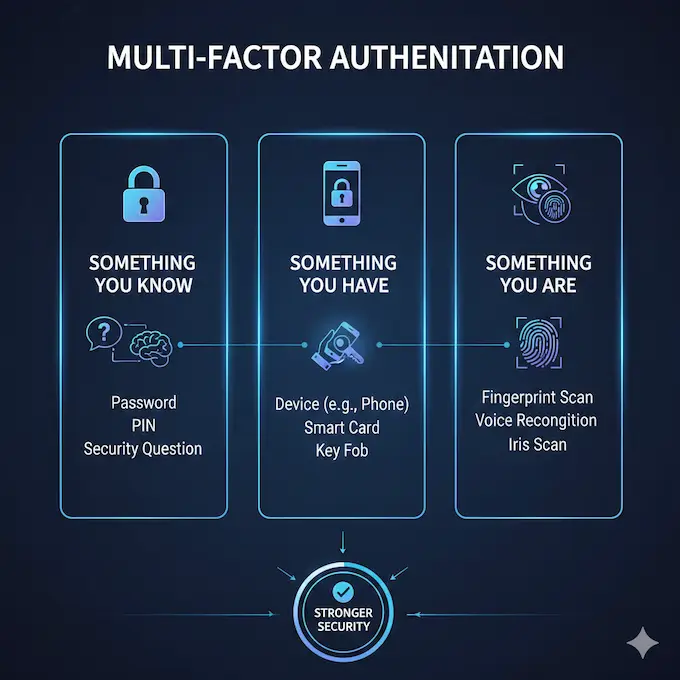
An MFA combination involves two or more of the following credentials:
Something the user knows: A password, PIN, or the answer to a security question
Something the user has: A device, a smart card, or a key fob
Something the user is: A biometric authentication, like voice, a fingerprint, or even an iris scan
Another common method is using Time-based One-Time Passwords (TOTP). These are usually random numbers that are only valid for a short time and are generated by apps like Google Authenticator.
These additional verifications provide layers of security, so that even if one of the authentication factors is compromised, anyone trying to gain unauthorized access encounters added obstacles that make it increasingly difficult. For example, if a password is compromised, the account cannot be breached without additional credentials.
While it may seem like this is a lot of information required to access each secure system, many organizations integrate Single-Sign-On (SSO) with multi-factor authentication to make it easier to log in to multiple applications.
Why is Implementing MFA Critical for Access Management?
Implementing multi-factor authentication strengthens your overall security posture by ensuring only authorized users gain access to sensitive systems and sensitive data. This is an important factor for companies following zero-trust principles.
Modern MFA solutions work seamlessly with virtual private networks (VPNs), remote desktop connections, cloud platforms, and third-party remote access systems to provide robust security across all remote connections.
Aside from strengthening security protocols, integrating MFA for remote access can also help your organization meet regulatory standards and compliance requirements like HIPAA, GDPR, NIS2, and PCI-DSS. It’s also helpful during audits to demonstrate compliance by restricting access to sensitive systems.
Is Two-Factor Authentication (2FA) the Same as MFA?
Not exactly. Two-factor authentication (2FA) is a form of multi-factor authentication. So what are the two factors used in two-factor authentication? The first one is usually something the user knows, like a password for an online account or the PIN to a credit card. The second factor can be anything the user has or is, such as a text to a device, a physical card, a fingerprint, or any of the other options listed above (and more!).
Given the nature of remote access activities, security is of paramount importance, and MFA adds a very strong additional defense to prevent criminal attacks. It should be a mandatory part of any enterprise remote access strategy.
I’m a huge believer in MFA for remote access for literally everyone in the organization to preserve your cybersecurity stance. So, here are three reasons why I’m passionate about seeing MFA as part of your secure remote access strategy.
1. There’s Too Much “Access” to Remote Access
The Scale of the Problem
While we’d all like to think that technologies like Microsoft’s built-in Remote Desktop Protocol (RDP) aren’t accessible from the Internet, that’s just not the case. Since October 2025, GreyNoise has tracked a coordinated botnet operation involving over 300,000 unique IP addresses from more than 100 countries specifically targeting RDP services in the United States. This represents just one campaign among countless ongoing attacks.
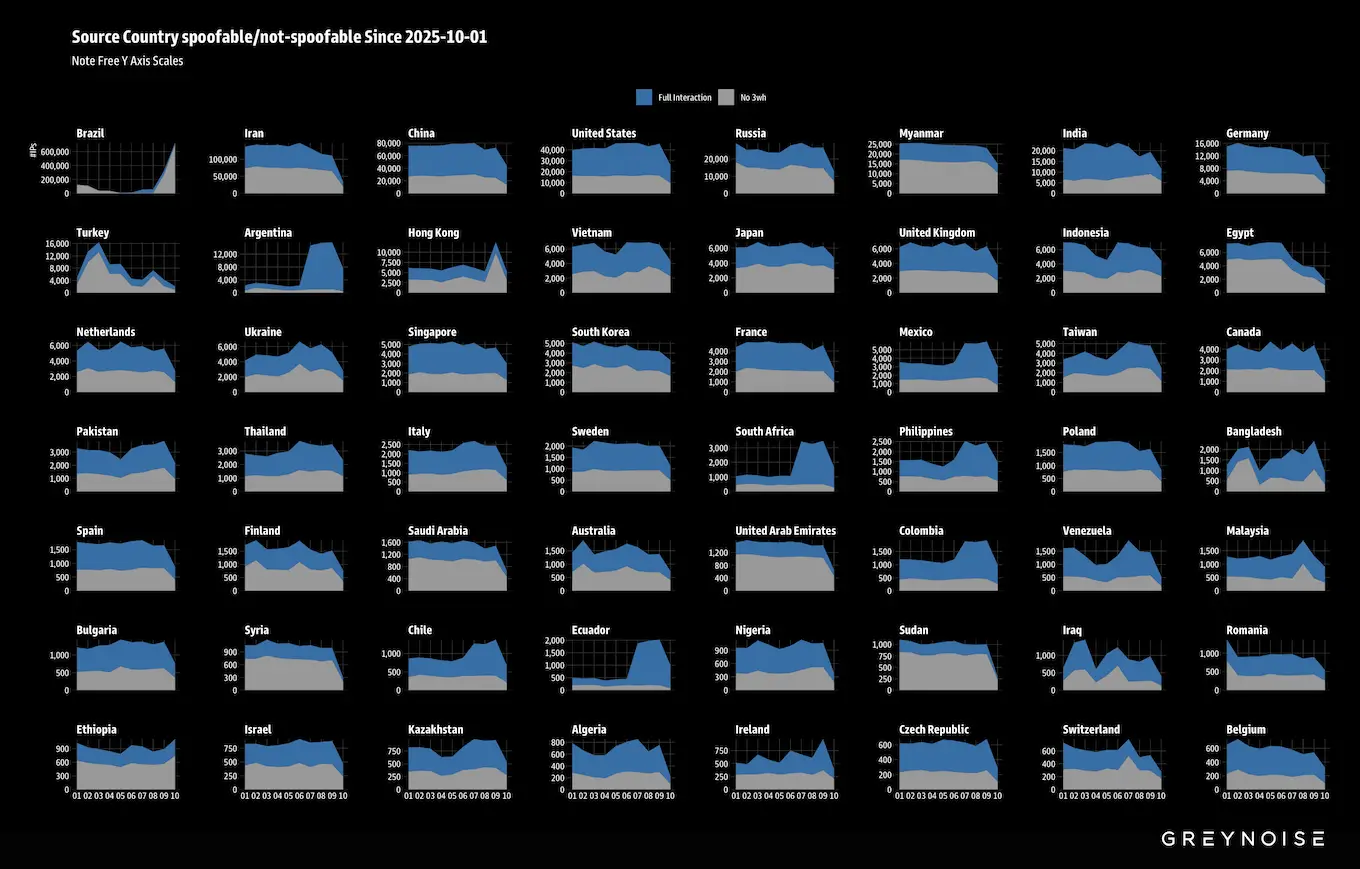
The scale and sophistication of these attacks continue to evolve just as fast as the technologies used to combat them. The botnet operation used centralized control with similar TCP fingerprints across participating IPs, employing RD Web Access timing attacks and RDP web client login enumeration, demonstrating that attackers are using coordinated, automated systems to probe for vulnerabilities at a massive scale.
Weak Passwords Compound the Problem
It’s not just sophisticated botnets that organizations need to worry about. Analysis of actual passwords used in live RDP attacks reveals why these campaigns persist. Specops Software examined 15 million passwords from real-world RDP attacks from 2024 to 2025 and found that 45% consisted only of numbers or lowercase letters, and 98.65% were 12 characters or fewer.
Even passwords that technically meet complexity requirements are commonly attacked. “P@ssw0rd” appeared over 254,000 times in these attacks, while “Welcome1” was found more than 113,000 times. These examples highlight a critical issue: Passwords that meet standard organizational requirements (8 characters, 1 capital, 1 number, 1 special character) can still be predictable and vulnerable because of common base terms.
Finding and Exploiting Exposed Connections Isn’t Difficult
One fundamental reason these attacks are so prevalent is the ease of finding and exploiting exposed remote access connections. Threat actors run automated scans across all ports looking for RDP responses, then launch brute-force password attacks when no MFA is required. Organizations monitoring their RDP servers often discover hundreds or even thousands of failed login attempts from hackers, bots, and ransomware operators.
The point here is that this massive number of attacks wouldn’t exist if there were no RDP sessions externally accessible in the first place. In short, there are way too many organizations today that have RDP-based access to their networks. And even if you’re not using RDP specifically, but are using a third-party remote access solution, many threat actors use the same solutions for remote access during cyberattacks.
Add Multiple Authentication Methods to Shut Down Threats
Should an organization require MFA over these exposed RDP connections (which should be disabled from direct Internet exposure, for the record), the likelihood of these attacks succeeding (as they exist today) diminishes to zero.
Even when attackers obtain valid credentials through brute force, password spraying, or credential stuffing, they cannot proceed without the second authentication factor.
There is no native Microsoft RDP solution to prevent brute-force attacks, so attackers have free rein to try as many user/password combinations as they like.
MFA transforms this vulnerability. Without access to the user’s second factor (whether it’s a mobile authenticator app, hardware token, or biometric verification), compromised credentials alone become useless to the attacker.
Be Wary of MFA Fatigue
While MFA is a massive hurdle for attackers, it is not a “set it and forget it” solution. Sophisticated threat actors now use “MFA Fatigue” or “Push Bombing” attacks. In this scenario, after obtaining a password, the attacker triggers dozens of push notifications to the user’s device, hoping the victim will eventually hit “Approve” just to make the alerts stop.
To combat this, organizations should move toward MFA number matching, which requires the user to enter a specific code shown on the login screen into their authenticator app, ensuring the person approving the request is the same person sitting at the keyboard.
2. Credentials Are Too Easy to Obtain
In many cases, the use of remote access comes in conjunction with a phishing campaign intent on tricking users into providing their Microsoft 365 credentials. In 80% of phishing attacks, the goal is to obtain user credentials, such as login credentials. Since these are often the same credentials as the user’s Active Directory account, the credentials provide a threat actor with everything they need, providing an RDP session to connect to within the same organization.
Multiple Credential Acquisition Vectors
Beyond phishing emails, credentials are being compromised through several interconnected attack methods:
Data breaches at third-party services leak passwords that employees reuse across work accounts
Password spraying attacks systematically test commonly used passwords (such as the 254,000 “P@ssw0rd” attempts documented in recent RDP attacks) across multiple accounts
Credential stuffing leverages breached username/password pairs from consumer services against corporate access points
Social engineering manipulates help desk staff into resetting credentials for attackers posing as legitimate users
Dark web marketplaces sell corporate access credentials, particularly those with remote access capabilities, at premium prices
The scale of this problem has accelerated dramatically. Organizations monitoring their systems often discover that attackers no longer need sophisticated technical exploits. They simply purchase or phish valid credentials and authenticate through legitimate remote access channels.
How MFA Prevents Credential Theft
Again, with the use of MFA in place for RDP, the credentials on their own are useless. An attacker may possess a valid username and password, but without the second authentication factor (whether a push notification to a registered device, time-based one-time password, or biometric verification), they cannot establish the remote session.
However, when organizations enable MFA as part of their secure remote access setup, they also likely have it in place for cloud apps, making the obtaining and use of credentials in the first place difficult to impossible. This creates a security posture where credential theft, whether through phishing or other methods, no longer provides attackers with meaningful access. The phishing email might successfully harvest a password, but without the second factor, the attack terminates at the authentication stage, making stolen credentials operationally worthless to the attacker.
3. Remote Access Provides Too Much Privilege
Every Compromised Account is a Gateway
A given compromised set of credentials initially gives threat actors a foothold within the business and access to any data and applications that the user has access to. This, alone, creates a tremendous risk, depending on the user account. It also gives them access to a Windows endpoint (in most cases). Depending on how well-patched the OS and applications are, the remote access endpoint may provide an easy path to obtaining elevated credentials by taking advantage of vulnerabilities commonly used in attacks. In addition, it gives the threat actor a known identity within the organization to further attack the rest of the company.
Real-World Attack Scenario: The Mailroom Clerk
I like to use the example of the mailroom clerk who only has web access to visit shipping company websites and their corporate email. If they were the ones compromised by a threat actor, they could be used to send a simple phishing email to every person in the organization. By using the social engineering tactic of informing victims that a package is waiting for them and providing a malicious link, a single low-level account becomes a launchpad for a company-wide breach.
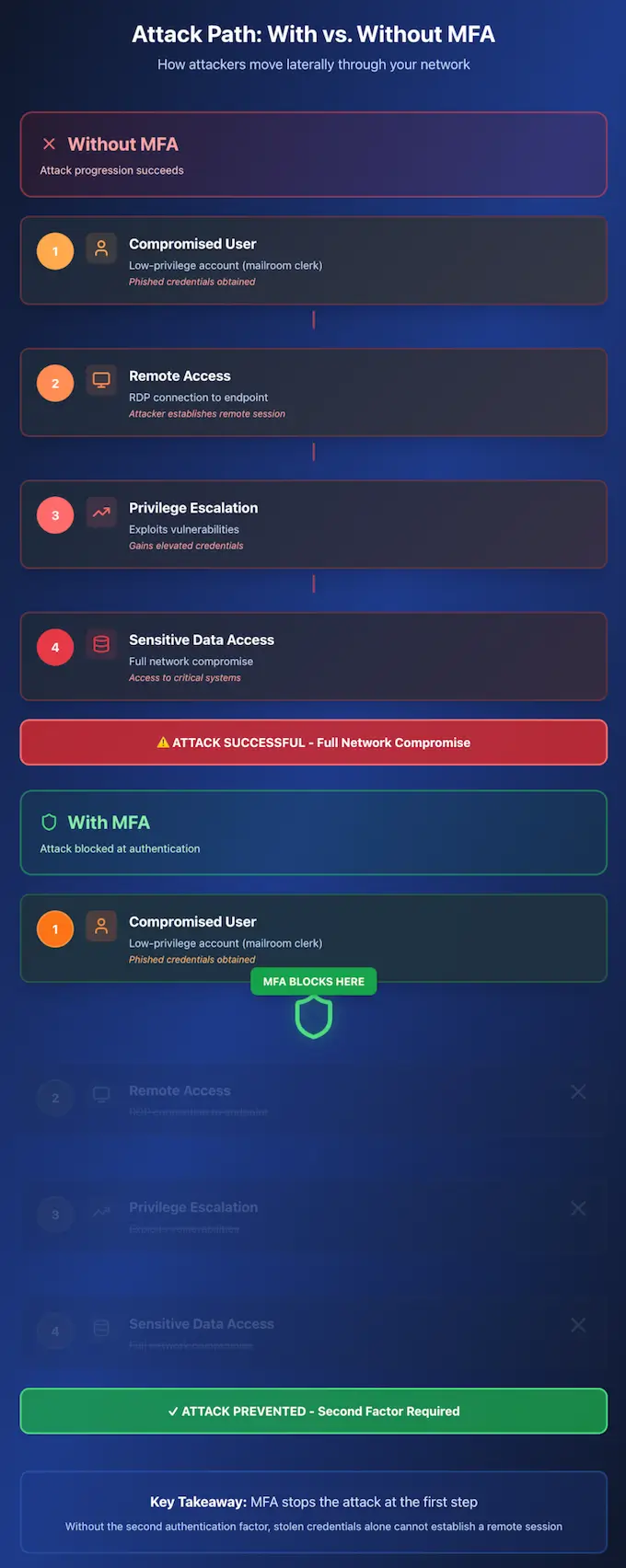
Add in MFA to this scenario, and the threat actor cannot reach the remotely accessible endpoint in the first place.
Implementing MFA is Just What Your Remote Access Needs
Secure remote access is a productivity play; it empowers organizations to extend the reach of the corporate network out to their employees’ homes, coffee shops, hotels, etc. But that extension also includes developing the organization’s potential threat surface to those very same places. The addition of modern MFA methods to remote access security creates a defense-in-depth strategy (layered on top of basic credentials) to help stop cyberattacks before they ever really get started.
Whether you rely on RDP, a VPN, or a third-party remote access solution, MFA for every user is no longer optional. It is the only way to ensure that the person using the credential is the actual owner of that identity. In an era where 80% of phishing attacks target your credentials, MFA is the single most effective investment you can make to protect your organization’s data, reputation, and future.
Don’t wait for a successful brute-force attack or a compromised password to prove the point. Secure your remote access with MFA today.