Splashtop is a commonly used remote desktop solution that enables users to access their computers from a different device. It’s aimed at companies that want remote business access to their PC network, and IT support professionals that provide reliable remote support to their customers.
It comes with a host of features, including screen sharing, file transfer, chat, and session recording, although the exact range of features available will depend on the subscription plans you choose.
Determining Splashtop pricing and overall Splashtop cost is actually quite tricky due to its complex pricing structure. While some competitors use simple tiered pricing models, Splashtop prices vary depending on the use case (remote access vs remote support) and features, which can be confusing.
In this article, we’ll break down exactly what you get in each subscription package so that you can decide if Splashtop is the right remote access option for you.
Remote Desktop and Access Plans
First, let’s take a look at the four pricing tiers the company has for remote desktop and business access: Solo, Pro, Performance, and Enterprise.

While the plan comparison table shows that all of the options include high performance and robust security, you have to do a little digging to find these details:
4K streaming up to 60fps
Cloud infrastructure hosted on AWS
All remote sessions are protected with TLS and 256-bit AES encryption
ISO/IEC 27001, SOC2, GDPR, and CCPA compliant
As we look at the different plan options, we’ll highlight any enhanced remote access features beyond these standard performance and security offerings.
Remote Access Solo
This basic plan is ideal for individual users who don’t plan to add any additional users or devices in the future. It’s priced at $5 per month, billed annually, and includes:
Maximum of two devices per license
File transfer
Remote printing
Solo is a good choice for remote workers who would like to access work desktops from home devices or small business owners who want to connect to a couple of devices.
Pros
It’s a budget-friendly option for business access solo users who only require basic remote business access and occasionally need to use remote file transfer and printing.
Cons
This plan doesn’t offer multi-monitor support and lacks advanced collaboration features.
Remote Access Pro
The Splashtop Remote Access Pro plan is designed for teams that need to remotely access their own computers and collaborate with others remotely.
One of the advanced features of this plan is that admins now have the ability to deploy, manage, and access users’ computers. This provides enhanced control over system configurations, improved security through centralized management, increased efficiency by reducing downtime, and streamlined IT operations, making it easier to support users and manage updates.
The pricing for Business Access Pro is $8.25 per month per user, which is charged annually at $99 per user.
Remote access for individual users and teams
Maximum of 10 devices per license
Multi-monitor support
Session recording
Ability to share screen
Two users can remotely access one computer
Pros
Supports more devices and offers enhanced remote management features.
Cons
Higher cost compared to the Solo plan and limited features for larger organizations.
Access Performance
At $13 per user per month (billed yearly), the Access Performance plan caters to teams that need high-end performance remote access. This plan includes all Pro features plus priority support and GPU acceleration, making it ideal for graphics-intensive tasks.
Additional details of this plan include:
Maximum of ten connected devices per license connected endpoints
USB device redirection
Mic passthrough
Premium quality audio and color accuracy
Wake-on-LAN
Pros
The Access Performance plan offers high-performance remote access with GPU acceleration and includes priority support for faster issue resolution.
Cons
The plan has a higher cost compared to lower-tier options and may be more than what is needed for users who do not require high-performance capabilities.
Splashtop Enterprise
Larger companies looking for custom solutions can opt for the enterprise version of Splashtop’s software. This is more easily scalable and provides more advanced security features as well as options for custom branding. The company does not provide a price for enterprise plans, as they are custom-quoted.
Enterprise End-User Licensing for Remote Work
This option is best for companies with distributed workforces that need flexible, secure, and high-performance remote access. It’s ideal for employees working from distributed locations.
Here are some of the features included in this plan:
Remote access
Maximum of 10 endpoints per user license
SSO integration
Mic passthrough
Scheduled access
Granular permissions
Android/IoT unattended access
Ultra high-quality audio (256k or 384k)
YUV 4:4:4 (Better color accuracy)
Pros
The end-user enterprise license provides scalability and flexibility for growing companies while also protecting user sessions using advanced security features. Greater device compatibility also gives companies the ability to support a greater number of device types and use cases.
Cons
One of the main drawbacks of this plan is the endpoint limitations, as it supports a maximum of 10 endpoints per user, which might be a limitation for larger organizations with more extensive device needs.
Another downside is that pricing is custom-quoted and not readily available, making budget planning more challenging for some businesses.
Enterprise Technician Licensing for Remote Support and Endpoint Management
This plan is ideal for IT professionals and support teams managing up to 300 endpoints per technician. It allows them to provide comprehensive remote support and effective endpoint management across their organizations.
Attended and unattended remote support
Advanced service desk workflow
Service desk channel management
Ticketing/ITSM integrations
Custom branding
SSO / SAML integration
Pros
The technician licensing plan enhances support efficiency and user experience with advanced service desk workflows, ticketing/ITSM integrations, and custom branding options. Additionally, it ensures secure and flexible access through strong security and access control features like SSO/SAML integration and attended/unattended remote support.
Cons
The extensive features and capabilities of this plan might be more than what’s needed for smaller IT teams or organizations, potentially leading to underutilization. Plus, advanced features and integrations may require a steeper learning curve and more initial setup time for effective use.
Remote IT and Support Plans
The Enterprise package isn’t the only Splashtop subscription available for remote support. There are actually several other support packages available for different team sizes. (We told you it was complicated!)
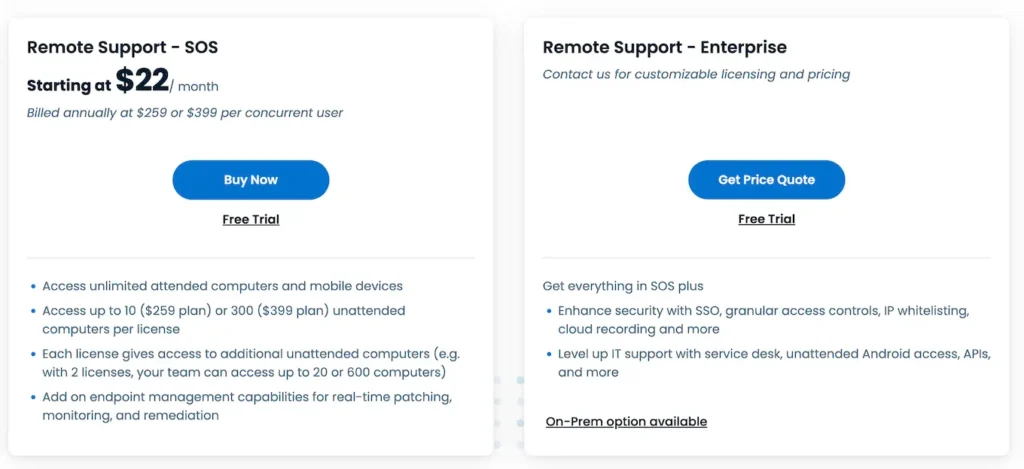
Remote Support – SOS
Splashtop SOS starts at $22/month and goes up to $33/month per concurrent technician (billed annually), is ideal for providing attended remote support. Technicians can connect directly to a user’s device to troubleshoot issues in real time.
This plan can be added to a Remote Access or Remote Support subscription and includes these key features:
Provides access for up to 10 ($259 plan) or 300 ($399 plan) unattended computers per license
Attended access with session code
Attended support for iOS and Android devices
Session reboot and reconnect
Elevate to admin
PSA ticketing and ITSM integration
Two technicians in one support session
Chat
File transfer
Session recording
User role and access management
In-session voice call
Pros
Affordable and suitable for real-time troubleshooting with robust security features.
Cons
Doesn’t include advanced security features such as SSO, IP whitelisting, or cloud session recording.
Remote Support – Enterprise
The enterprise remote support plan is fairly similar to the higher-capacity SOS plan, with a few exceptions. Since pricing is provided as a custom quote, it’s unclear if the added cost is justified by these additional features:
Background actions
Advanced security features: SSO, SIEM logging, IP whitelisting, cloud session recording
Unattended Android access
Advanced service desk workflow
Additionally, you need the enterprise plan to be able to add Splashtop Augmented Reality or Splashtop Connector.
Pros
Adds enterprise-grade security, service desk workflows and advanced device management for teams supporting large or regulated environments.
Cons
Custom pricing and feature overlap with SOS make it harder to justify the higher cost unless you need advanced security, workflows or required add-ons.
Splashtop Personal Pricing
So far, the packages we’ve covered are all targeted at Splashtop business access, but you may be wondering how much the cost of Splashtop software is for home users. Here are all the Splashtop remote desktop price options for home users:
Anywhere Access Pack
The Anywhere Access Pack is priced at $16.99 per year and extends the capabilities of the Splashtop Personal plan by allowing secure remote access to up to five devices from anywhere outside the home network.
Pros
An affordable yearly cost that enables remote access from anywhere.
Cons
Still limited to non-commercial use.
Productivity Pack
The Productivity Pack, also priced at $16.99 per year, enhances the Splashtop Personal plan with productivity features like live annotation and support for on-screen shortcuts, making it easier to interact with remote devices.
Pros
Adds useful productivity features for an affordable yearly cost.
Cons
Limited to non-commercial use, additional cost for features that may not be needed by all users.
These plans offer varying levels of functionality tailored for non-commercial users, providing a range of features from basic remote access to enhanced productivity tools.
Does Splashtop offer nonprofit pricing?
There is the option to access discounted rates if your organization is Section 501(c)(3) tax-exempt. To access the discount, you will need to contact the Splashtop sales team with a copy of your 501(c)(3) tax-exempt letter. They’ll then send you a code to use during the checkout process.
Looking for a Splashtop alternative?
Although Splashtop is a widely used remote access solution, there’s no doubt that the complexity of the licensing and pricing systems can cause confusion when it comes to cost comparison and finding the best value software package for your needs.
So, if you’re looking for an alternative that is flexible, affordable, and has all the advanced security features you would expect from a top-tier solution, consider using RealVNC® Connect instead.
It’s a single product that you can deploy for all remote access scenarios, so there’s no need to deal with complicated licensing structures. You choose between paying per user (from $9.32 per month) or per machine (from $3.69 per month), and that’s it. Simple.
This means it’s much more straightforward to scale your subscription up or down as required.
In addition, the fact that RealVNC Connect has a simple, streamlined interface means you and your team can get up and running quickly. You only need to install two components for unattended support and just one for instant support.
If you want an on-site solution, the only possibility with Splashtop is the dedicated Splashtop On-Prem option, which can be pretty expensive. On the other hand, if you have a RealVNC Connect Enterprise license, you can access both cloud and direct connections with a single subscription.
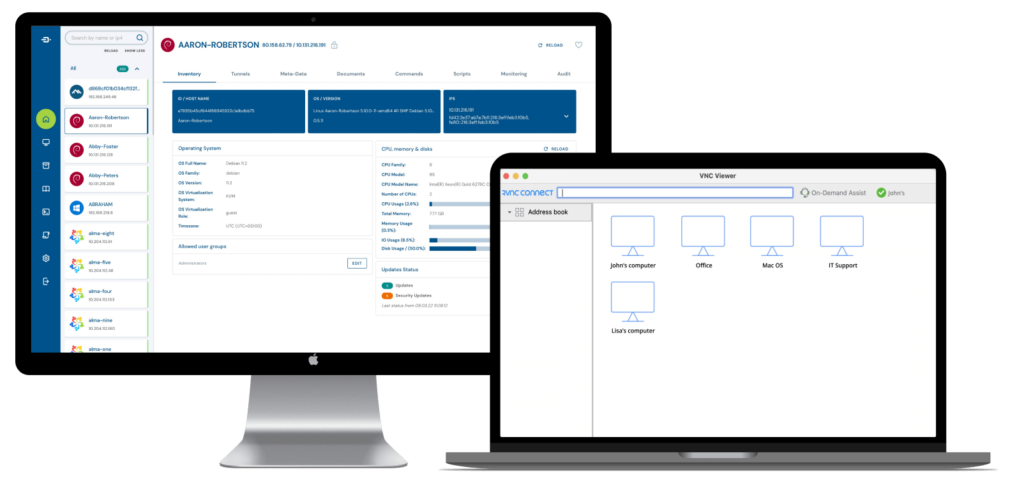
And, while Splashtop offers only limited authentication functionality, RealVNC Connect comes with a full suite of high-end security features, including multifactor authentication, device authorization, and 128-bit or 256-bit AES encryption. It’s also the only solution to have undergone an independent white box security audit and receive company-wide ISO 27001 certification.
It all adds up to a much more flexible package, which also avoids the confusion of the Splashtop cost options. So, if you’d like to find out more about what RealVNC Connect can offer your business, reach out to one of our experts for more information or see it in action by signing up for a 14-day free trial today.