If you are searching for a Jump Desktop alternative that’s built for enterprise remote desktop use, focus on what your procurement and operations actually validate during evaluation.
Start with third part security evidence, then look closely at governance controls, protocol standardization, and the support models behind the remote access software. As remote desktop tooling is now considered core infrastructure, vendor longevity is also something to keep in mind.
RealVNC Connect fits as a benchmark because it is built for enterprise deployments, audited environments, and long-term continuity of service.
Understanding Jump Desktop and when to consider alternatives
Jump Desktop is a remote desktop software server and client with some browser-based connectivity and enterprise features. It uses a mixture of RDP, VNC, and its proprietary Fluid protocol. That means that one Jump Desktop install can reach multiple endpoints, but businesses are vendor-locked to the platform.
Businesses and individuals tend to pick Jump Desktop for personal use, small teams, and some limited cross-platform work, especially on Mac and iPad, where the UI is polished, and setup is fast. Jump Desktop requires an account, but offers some free features. Notably missing is the ability to remote to Linux desktops using the Fluid protocol, where VNC over SSH and a static IP or hostname is required to connect.
The limitations of Jump Desktop show up quickly, with the main complaint being the pricing model. True cross-platform remote desktop access with Jump Desk requires a separate paid subscription for each type of operating system.
Remote access solutions that are built for enterprise, like RealVNC Connect, provide a true and seamless cross-platform experience for teams.
Comprehensive evaluation framework for enterprise remote access alternatives
For enterprises, finding a Jump Desktop alternative is much more streamlined when the framework for the decision is repeatable. Treat each remote desktop as a tool that’s going to assist support teams and not a quick shortcut or convenience app.
Below is a detailed framework that takes enterprise remote needs into consideration. You can adapt it to your business operations and workflows and use it when evaluating each tool:
- Security certifications and compliance validation. Make sure that, at a minimum, any potential remote access software is ISO 27001, SOC 2 Type II, and FIPS 140-2 compliant. A vendor should also be able to provide an independent audit if it claims to feature robust security.
- Enterprise management and administration. Enterprise-grade software needs enterprise-ready central governance. Verify with vendors that an on-premises or cloud management console is included. Authentication and identity services should also fit your current tooling or support ID services from Entra, Okta, or Azure. Make sure that any solution produces secure and adequate logging for audit purposes.
- Protocol architecture and vendor independence. Standard remote access protocols should be used across all operating systems, as having multiple in play (VNC, RDP, etc.) means that each can fail differently. Remote access software should also integrate with current tooling rather than require businesses to be locked into a vendor tech stack.
- Commercial support and vendor stability. Understand your requirements for SLAs, support escalation paths, and 24/7 human support. Then make sure that any solution will provide this as a minimum. Validate the longevity of the vendor using enterprise references. The last thing any business wants is to sign a contract only to have the vendor go out of business.
- Deployment flexibility. Enquire about deployment options. Is it automatic? Can you use your deployment and packaging tools to roll it out? Is there any manual configuration required on endpoints? Check how endpoints and servers authenticate, and connections traverse perimeter firewalls to maintain security for secure remote access.
- Licensing and TCO. Dive deep into the terms and conditions of licensing and payment plans. Compare subscription tiers versus any one-time add-ons. Watch for hidden costs like premium support or higher tiers for access to relay infrastructure.
Security certification gap and enterprise compliance requirements for remote desktop
Procurement and risk teams aren’t so interested in what button sits where and an impressive list of features. They want proof that the tool is secure. While Jump Desktop does have end-to-end encryption, SSL/TLS, and SSH tunneling, security certification is noticeably absent.
In regulated environments, security reviews demand evidence outside of what a sales deck claims, including audit scopes, validation cadence, and who independently checks the security claims. It’s not enough to claim there is independent testing. The vendor should be reliable, open, and transparent about the results and what they did to remediate issues that were discovered.
RealVNC Connect packages security assurances in the RealVNC Trust Center and supports an ISO/IEC 27001 certified program. That gives evaluators a clear indication that RealVNC takes security seriously.
Protocol standardization vs. proprietary vendor lock-in
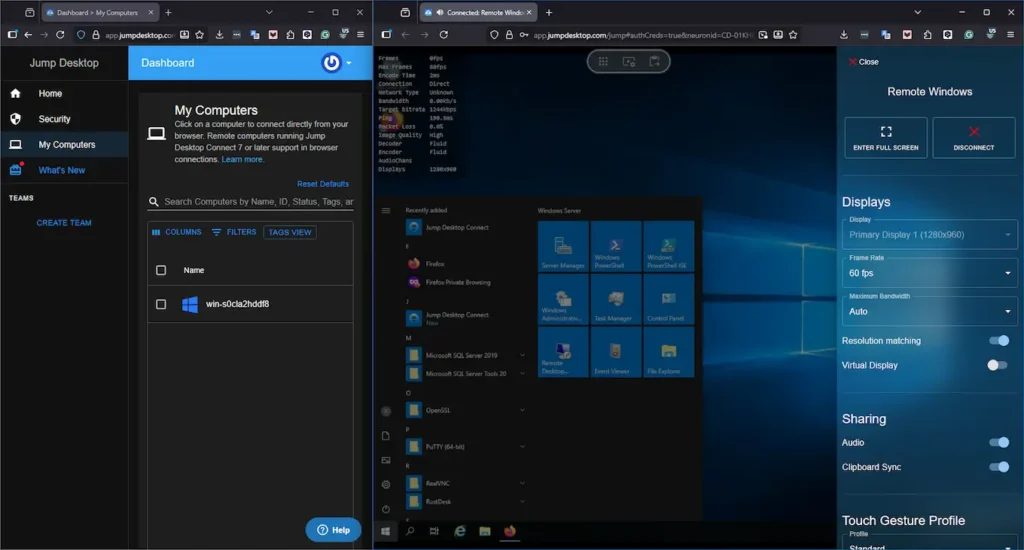
In Jump Desktop, the protocol choice can be considered a selling point. One Jump Desktop can run remote desktop via RDP, VNC, or the Fluid protocol for tuning performance. That flexibility might be advantageous for smaller operations, but it comes at a cost for enterprises in the form of support workflows and vendor lock-in.
Each stack behaves differently and requires separate network rules and ports, so support teams troubleshoot three paths, and users experience inconsistent screen sharing behavior across Windows, macOS, and Linux machines.
Using a standardized protocol across all operating systems reduces training time, consolidates playbooks, and keeps connections predictable when it matters most. RealVNC Connect uses a Unified VNC protocol (IETF RFC 6143) across all operating systems, making it a true cross-platform remote access solution, unlike Jump Desktop.
Enterprise management maturity and scalability
Once remote desktop moves past the pilot stage, management and centralized governance start to matter more than raw performance. Administrators and teams need a centralized view of devices, a clear separation of duties from users, and logs that contain adequate information for auditing.
Growing businesses will also pay attention to a tool’s ability scale with endpoint growth. New and reimaged machines should be able to receive remote access agents with the existing packaging and deployment tools. If remote access software needs manual configuration (even via a script), application and desktop support teams will soon tire of having to configure every single productive computer and server.
RealVNC supports centralized administration through the on-prem management console, even for offline and air-gapped networks. RealVNC is a reliable alternative that offers API access to automate administration tasks and integrates with your existing infrastructure. For identity, the Enterprise plan supports SSO with Microsoft Entra and Okta, meaning you’ll never be expected to install additional vendor software just for enterprise-grade maturity.
Industry use cases and deployment scenarios
In healthcare or finance, procurement will have reservations until the security evidence is crystal clear. There also needs to be clear evidence of audit trails so policy owners can show how secure remote access is enforced. Good security packaging reduces exceptions and makes approvals more routine instead of change control marathons.
Teams also need visibility into remote sessions themselves, including session recording for investigations and compliance checks. Having access to consistent screen-sharing controls is also important in sectors like healthcare, finance, and government.
Global firms with distributed workforces also must apply consistent policy across regions and mobile devices with predictable security controls and governance that can scale. The technical consulting firm Arup uses RealVNC Connect for exactly this reason. Arup has close to 17000 licenses across 40 countries, which signals enterprise scale in the real world, not just in a lab.
Deployment architecture and infrastructure considerations
Jump Desktop teams can route remote control connections through a vendor relay or an on-prem self-hosted server you control and operate. However, it does require configuration, telling endpoints to choose the local relay over the public one.
RealVNC Connect offers the same direct connection functionality with its on-prem offline setup, though with configuration managed centrally through offline licensing servers. Teams using the RealVNC Connect cloud-brokered get the best of both worlds. RealVNC Connect clients first attempt a direct connection, then fall back to the secure cloud relay if the environment doesn’t allow it.
Best practices for evaluating Jump Desktop or free alternatives
For IT teams evaluating any Jump Desktop alternative, start with this five-step checklist:
- Document all regulatory requirements, including HIPAA, PCI DSS, FedRAMP, or SOC 2.
- Define security certification needs, including ISO 27001, SOC 2, and FIPS.
- Assess the vendor’s stability using enterprise references and perform due diligence on their financial position.
- Identify support SLAs, including 24/7 coverage and escalation.
- Determine which remote access protocols are in use and how each one affects network configuration, security, and portability.
RealVNC Connect as an established enterprise alternative
Enterprise procurement teams pick a Jump Desktop alternative based on proof rather than a sales pitch and feature set. The good news is that RealVNC Connect Enterprise already aligns to your business’s security, deployment, and operational requirements:
- Transparent third-party security certifications in the RealVNC Trust Center and published independent audits and penetration testing by Cure53.
- A unified VNC protocol approach regardless of whether you’re using macOS, Windows, Linux, or mobile devices.
- Support with SLAs that protect remote access when your business needs it the most.
- Proven vendor stability with over 25 years in the enterprise remote access sector.
- Flexible deployment that keeps options open and security boundaries clear with on-prem offline deployment and cloud brokering.
- Account controls that add security features like AES-GCM 128- and 256-bit encryption, TLS 1.2, and multi-factor authentication out of the box.
Conclusion: Selecting certified enterprise remote access solutions
Jump Desktop works well for personal use and small teams who just want quick remote access without flexibility in protocols. Enterprise teams need stronger security evidence, clearer centralized governance, and SLA backed support for production risk.
When looking for an alternative, carefully evaluate the security certification, protocol standardization, deployment architecture, and pricing models. Then, match the tool to your compliance obligations and operational reality.
For organizations that need a Jump Desktop alternative that is enterprise-grade from the start, explore how RealVNC Connect Enterprise aligns with your security, deployment, and vendor requirements.
Frequently asked questions about Jump Desktop alternatives
What security certifications does Jump Desktop have compared to RealVNC?
Jump Desktop states that it has end-to-end encryption, TLS, and tunneling over SSH. RealVNC Connect published third-party security certifications, robust security features, and independent audits in its Trust Center for transparency.
How does the Jump Desktop Fluid protocol compare to VNC?
Jump Desktop’s Fluid protocol is proprietary and can only be used with its tech stack. VNC is widely implemented and accepted by numerous remote access tools, meaning it has greater cross-compatibility with different platforms.
Can Jump Desktop meet enterprise compliance requirements?
It can meet basic enterprise requirements, but still lacks documented security evidence, connection relaying, and endpoint configuration. It is more suited to smaller environments.
What support differences exist between Jump Desktop and RealVNC?
Jump Desktop provides email support and documentation, plus teams-only support during business hours. RealVNC Connect provides SLA-backed 24/7 human support for business-critical use.
How do deployment architectures differ?
Jump Desktop has both public and private relays, and direct connections via manual client configuration. RealVNC Connect offers both on-prem and advanced cloud-brokered remote access for security control.