Comprehensive evaluation framework for enterprise WayVNC alternatives
An enterprise remote desktop solution should be viewed as a governance decision rather than a quick tool swap. The easiest way to keep the evaluation honest is to break it into five checks, then score each option against any WayVNC alternative.
1. Platform coverage and ecosystem compatibility
Confirm the usage and breadth of operating systems in your fleet. An enterprise VNC solution should support Windows, macOS, and Linux, plus mobile access across iOS and Android. Your solution should be compatible across Linux windowing managers like Gnome/KDE/XFCE, as well as supporting RDP and VNC where needed.
2. Enterprise management and administration
Keep centralized administration a priority. A central management console that groups devices, assigns RBAC, and generates audit log data, either on-premises or via the cloud, is an enterprise requirement. The remote access solution should also enable identity and authentication management from an enterprise-level identity manager, such as Azure, Okta, or on-premises Active Directory Domain Services.
3. Security architecture and compliance readiness
A security review starts with what protections are offered out of the box. Validate encryption standards such as AES-256 and Perfect Forward Secrecy. Demand strong authentication options, MFA, SSO, and certificate-based modes, plus password controls that are enforceable.
4. Deployment flexibility and user experience
Deployment options should work with what you’re already using: SCCM, InTune, MDM, and silent installs. Network architecture should support both direct and cloud-brokered deployment models. It’s also best to avoid any solution that requires extensive perimeter firewall changes, like permanent port forwarding or the use of a VPN.
5. Commercial support model
Evaluate the vendor support, SLAs, quality of documentation, and what support will look like after the dust has settled. A fast response from product experts always beats a forum thread with limited to no details.
| Evaluation criterion | WayVNC characteristics | Enterprise solution requirements |
|---|---|---|
| Platform support | Narrow scope | Windows, macOS, Linux, mobile |
| Management capabilities | Local config | Console, RBAC, audit |
| Security and compliance | DIY hardening | secure controls, certifications |
| Deployment model | CLI-first | MDM, automation, repeatable rollout |
| Support structure | Community | SLAs, expert support |
Cross-platform capability and unified infrastructure management
Teams looking for an enterprise alternative to WayVNC are likely dealing with Linux boxes, but the reality is that most organizations have mixed fleets. That requirement alone explains why Wayland-only designs stay at the edge, while broader platforms sit at the core.
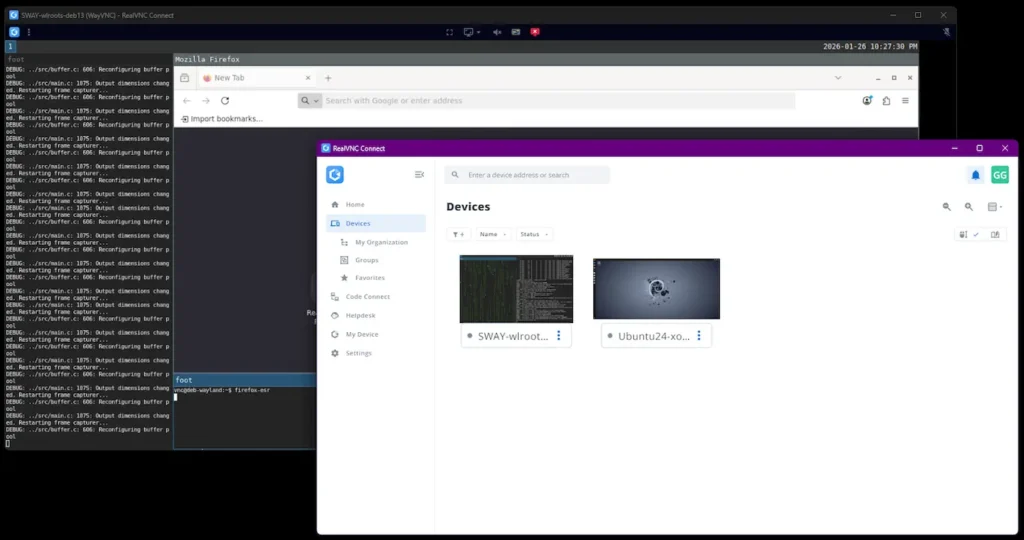
Teams looking for an enterprise alternative to WayVNC are likely dealing with Linux boxes, but the reality is that most organizations have mixed fleets. That requirement alone explains why Wayland-only designs stay at the edge, while broader platforms sit at the core.
Platform coverage for heterogeneous environments
Enterprise teams need full OS coverage across Windows 10, 11, and Server editions, recent macOS releases, and Linux desktops like RHEL, SUSE, and Raspberry Pi OS. Architecture support should also span x86_64 and ARM, so the same client workflows apply whether the host is sitting on a VM or someone’s lap at the airport.
Platforms like RealVNC Connect focus on validated support across common enterprise operating systems, rather than a single Linux Wayland scope.
Operational advantages of unified management
A single console makes policy enforcement across every remote desktop much simpler. Security rules stay consistent, audit trails are centralized, and compliance reporting can be done from one place. Training becomes easier with a unified application that functions as both a viewer and server, and procurement deals with a single vendor, which means a clear path for escalation.
Enterprise features and management capabilities
A basic VNC session handles framebuffer delivery, but enterprise environments need governance layered on top of the transport. This explains why teams tend to move a single-host tool to a managed platform like RealVNC Connect, which can provide:
- Centralized management. A browser console groups devices, assigns policies, and tracks licenses across workflows.
- Identity integration. Enterprise-ready solutions support SSO and MFA through Microsoft Entra ID, Okta, or SAML.
- Access control. RBAC defines what named accounts can initiate a session, approve a request, or use certain functionality within a remote session.
- Compliance tooling. Session recording and log data are immutable.
- Automation APIs. REST APIs create and revoke access, integrate with ITSM, and deploy at scale using application deployment platforms such as InTune for Windows service rollout.
Industry use cases beyond Wayland and Linux desktop environments
Outside of pure Wayland setups, IT teams need a solution that can hold together across regions and device types, while staying compliant with local regulations. Below, we can see two real examples of where RealVNC Connect shines beyond the Wayland and wlroots niche.
Cross-platform enterprise IT support
Picture a global firm with 2000 staff, all using Windows laptops, macOS notebooks, and Linux workstations, backed by a central server team. WayVNC struggles here because its scope is tied to Linux and Wayland, leaving large parts of the desktop fleet uncovered.
Embedded systems and specialized deployments
Other teams manage kiosks powered by Raspberry Pi, industrial HMI panels, and medical systems. These VNC use cases demand secure access, evidence of compliance, and accountability from vendors. Wayland and WayVNC were never aimed at that level of operational risk, while enterprise platforms like RealVNC Connect stay relevant long after deployment for an initial use case.
Addressing remote desktop technical challenges and limitations
Once businesses try to scale with tools like WayVNC, a set of common challenges begins to appear:
- Challenge: Platform fragmentation. Solution: A unified client and server model like RealVNC Connect V8.
- Challenge: Security governance. Solution: Replace the manual SSH port forwarding and tunneling with RealVNC Connect’s end-to-end encryption and strong authentication.
- Challenge: Scale management. Solution: Centralized control via the RealVNC Connect management console.
- Challenge: Support expectations. Solution: Commercial vendor support by RealVNC, backed by formal certifications, such as ISO2700,1 reduces operational risk.
Best practices for evaluating and selecting VNC alternatives
It’s best to treat evaluation like a change control. This is so the tool services rollout, audits, and the first real high-stakes incident:
- Document platforms and volumes, then map who actually needs access and why.
- Define all secure requirements, MFA, SSO, and authentication controls.
- List integration points, directory, MDM installation, ITSM, and advanced monitoring.
- Set success metrics, deployment time, ticket reduction, and user satisfaction.
- Testing and pilot with real users, then test the cross-platform connectivity and console.
RealVNC Connect as a comprehensive enterprise solution
RealVNC Connect is an enterprise remote desktop platform that’s built on the back of over 25 years of VNC engineering. It supports validated Windows, macOS, and Linux coverage, all under centralized management that is backed by commercial support.
The security model uses AES-GCM with PFS, maintains session log visibility, and includes offline deployment and self-hosting for secure sites. With RealVNC Connect, Wayland endpoints can keep WayVNC through viewer interoperability, while enterprises like Arup have already scaled to over 17,000 endpoint licenses across 40 countries using RealVNC as their approach to mixed fleets.
Selecting the right remote access solution for your organization
WayVNC fits single and personal use Wayland compositors well, but Enterprise environments come with governance expectations that it simply cannot facilitate.
When evaluating each alternative, take into consideration enterprise management, security, and commercial support. RealVNC Connect aligns with all of those criteria, making it not only an ideal alternative to enterprise WayVNC but one that is proven to provide what growing businesses need:
- Platform scope. One toolset that reduces complexity across the entire desktop fleet.
- Enterprise readiness. Centralized management, MFA, SSO, and auditing.
- Commercial backing.Vendor SLAs, certifications, and predictable paths for escalation.
Explore how RealVNC Connect can meet your organization’s remote access requirements with enterprise-grade capability and proven reliability.
Frequently asked questions about WayVNC alternatives
What’s the main difference between WayVNC and enterprise VNC solutions?
WayVNC is a Linux VNC server that’s designed to work exclusively with Wayland compositors (such as wlroot, SWAY, modern Linux desktops). Enterprise VNC solutions like RealVNC Connect can work with multiple operating systems, not just Wayland-based Linux distros.
How does security differ between basic VNC and commercial solutions?
A basic VNC setup is typically not encrypted by default and will need additional hardening, like SSH tunneling. Enterprise solutions like RealVNC Connect have strong encryption and authentication built in.
Can RealVNC Viewer connect to WayVNC servers?
Yes, it can. The RealVNC Viewer works as a VNC client using the standard VNC protocol over a LAN or WAN. Basic AES-128 encryption can be configured, with authentication tied to Linux user accounts.