Linux desktops are quietly changing under the hood. Wayland adoption in favour of X11 is slowly moving forward. The popular KDE Plasma has become Wayland-exclusive from version 6.8, along with Raspberry Pi OS in 2024.
That shift has created a practical catch for remote access. Since Wayland remote desktop is still compositor-specific, WayVNC targets wlroots-based Wayland compositors rather than every single Wayland session a user ends up running.
WayVNC is a focused VNC server built for these environments. RealVNC Connect delivers a cross-platform remote access suite that is designed for mixed fleets and scale. This guide is going to look at WayVNC and RealVNC to see which remote access solution offers the best functionality for enterprise teams who live in wlroots, Hyprland, and SWAY.
You will leave with clarity on:
- Architectural scope and intent.
- Platform compatibility expectations.
- Deployment and management efforts.
- How well each aligns with real operational needs.
WayVNC vs RealVNC architecture and scope
Before getting into the specifics, it helps to get back to basics and take a look at the problem each platform aims to solve, and how it is built to get it done.
Technical architecture and scope
WayVNC and RealVNC Connect both provide the means to control a VNC session remotely, but they solve different problems. WayVNC is a single-purpose VNC server built for Wayland environments that use wlroots-based compositors.
RealVNC Connect takes a broader approach. It combines RealVNC Server, RealVNC Viewer, and a cloud connection broker into a unified remote access platform. The architecture is designed to support as many different operating systems, machines, and network environments as possible.
Both WayVNC and RealVNC Connect use the RFB protocol, but RealVNC extends it with enterprise-grade features that support authentication, policy control, and centralized administration that scales.
Feature and capability comparison
| Area | WayVNC | RealVNC |
|---|---|---|
| Platform support | Linux Wayland only | Windows, macOS, Linux, Raspberry Pi, iOS, Android |
| Feature scope | Core VNC server, headless mode, RSA, AES, and TLS | Screen sharing, file transfer, chat, recording, and multi-monitor |
| Deployment model | Manual install, CLI config | GUI setup, cloud connect, MDM |
| Management | Per-machine setting | Central console, authentication, RBAC, audit log |
| Support | Community support | Commercial support, SLAs |
| Licensing | Free open source | Subscription |
| Documentation | Man pages and source | Knowledge base and guides |
| Primary fit | Single-platform Wayland | Enterprise, mixed OS |
Matching VNC solutions to organizational context
When choosing between tools, often context matters more than feature checklists.
Platform environment assessment
Teams that run pure Linux stacks on Wayland tend to appreciate native behavior and simple config that’s relatively easy to implement. WayVNC fits these environments well. When you add Windows, macOS, and mobile devices into the mix, WayVNC is no longer a tool that’s fit for purpose.
RealVNC Connect can not only handle platform diversity, BYOD, and remote access across mixed fleets, but also supports businesses that are growing beyond Linux.
Scale and management requirements
A small team managing under 10 endpoints can accept manual installation, SSH connection tunneling, and community support. WayVNC installation can be streamlined to a degree, but when device counts grow beyond 50, manual configuration becomes a bottleneck in your business operations and support workflows.
RealVNC Connect, with its broader approach to operating system compatibility, is better suited to organizations that need governance layers beyond just remote access to Wayland-based sessions. It provides centralized management via a console, authentication, and team management that reduces rollout time across large organizations.
Platform support and deployment on Raspberry Pi
Platform scope becomes quite obvious when you start supporting remote sessions on a Raspberry Pi.
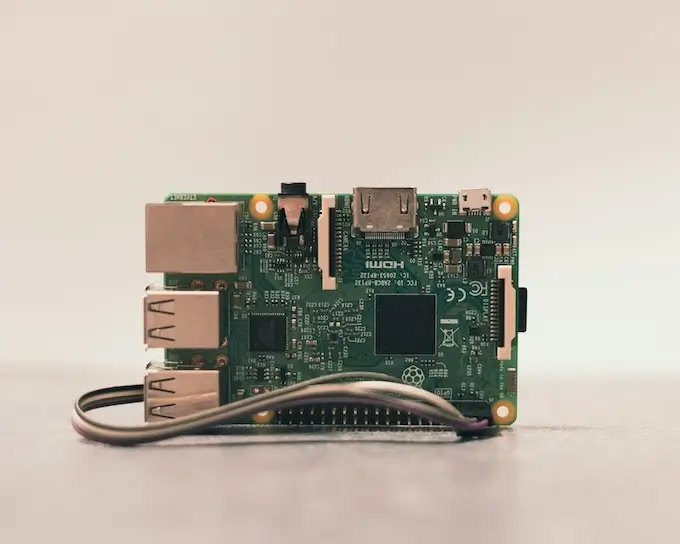
WayVNC runs only on Wayland systems that use wlroots-based compositors like SWAY and River. It does not mean that a remote user can attach to a full GNOME or KDE Wayland session.
A Pi typically starts with Raspberry Pi Imager, followed by checking the Raspberry Pi’s IP address on the network. From here, WayVNC then needs to be manually enabled via sudo systemctl, certificate and encryption set up, and the compositor launched from a named Linux user account terminal before a VNC connection can even get off the ground.
RealVNC Connect covers far more ground, including Raspberry Pi OS, Windows, Linux distros like RHEL, SUSE, and Rocky, and Debian-based Ubuntu. It can be deployed quickly, and once set up, the RPi can be used without an attached monitor.
Features, authentication, and support encryption
Both tools cover the fundamentals of VNC remote control, but the differences show up once security and scale become a requirement of enterprise. WayVNC is explicit with authentication toggled through enable_auth and reliance on TLS and RSA AES-128 encrypted transport — only after you specify it inside of the WayVNC config.
RealVNC Connect starts from the assumption that all networks are hostile and that session security features should be present from the very first session. End-to-end encryption is enabled by default, with TLS, AES-256, and Perfect Forward Secrecy protecting cloud-brokered connect paths.
RealVNC Connect also comes with feature integrations not available for WayVNC server, such as:
- Collaboration tools: File transfer, chat, remote printing, multi-monitor support, and clipboard sync.
- Management capabilities: User provisioning, policy enforcement, licensing, and audit logging.
- Integration options: API access, SSO providers, MDM platforms, and SIEM.
The minimalist design of WayVNC can suit smaller teams, but enterprises that demand security, centralized control, and governance (while still being able to remotely access Linux desktops) will find RealVNC Connect is a more robust remote access solution.
Industry applications and deployment scenarios
Real-world use cases make the differences between WayVNC and RealVNC Connect quite clear.
Development and Linux desktop environments
WayVNC is suited to developers who frequently use Wayland compositors like SWAY or Wayfire, where a lightweight VNC server and TightVNC viewer feel native and natural. RealVNC Connect fits where teams are distributed, working across different operating systems, and where enterprise features like file transfer and collaboration are needed.
Enterprise and commercial deployments
For tightly-controlled Linux shops with experienced admins, WayVNC fits just fine. RealVNC Connect supports corporate ITSM, MSPs, and regulated sectors that need compliance with data framework certifications, centralized governance, and a remote access solution that can grow with the organization.
Arup, a technical and professional consulting company with over 17,000 RealVNC Connect licenses, 92 offices in 40 countries, and a distributed team of over 13,000 professionals, proves just how scalable RealVNC Connect is in real-world environments.
Addressing common deployment challenges
Most deployment issues come down to trade-offs made during the tool selection process rather than mistakes during deployment.
Platform diversity:
- Challenge: mixed Windows, macOS, and Linux estates.
- Solution: WayVNC fits homogeneous Wayland setups, while RealVNC supports broader connections.
Security and compliance:
- Challenge: meeting authentication, encryption, and audit needs.
- Solution: WayVNC relies on manual hardening and ssh, while RealVNC provides built-in controls and audit log output.
Support capacity:
- Challenge: limited staff handling errors or failed sessions.
- Solution: community support versus SLA-backed response.
Rollout speed:
- Challenge: deploying to hundreds fast.
- Solution: scripted installs or cloud connect and MDM automation.
Best practices for selecting a VNC server
Using a clear framework helps avoid any underplanning or overthinking when it comes to selecting a VNC server for your operational reality.
- Document platform needs across Windows, macOS, Linux, and Raspberry Pi estates.
- Assess user skill levels and comfort with command-driven config versus GUI tools.
- Define scale and management needs by connections and centralized control.
- Identify authentication, encryption, and audit log requirements early.
- Match support expectations with a community or SLA-backed response.
- Calculate the total cost of ownership beyond free licensing alone.
For enterprise teams, steps three through five usually decide the outcome, since scale, centralized authentication, and audit log requirements tend to rule out improvised configuration work.
Selecting VNC solutions aligned to organizational needs
WayVNC services focused Linux teams that value Wayland-native workflows and behavior, a lightweight VNC server, and open control. RealVNC Connect addresses broader needs with cross-platform access, centralized authentication, and commercial support for organizations running a diverse range of operating systems beyond just Linux.
Tool selection is dependent on context, where platform diversity, scale, governance, and risk tolerance are more important than a feature checklist. Teams with compliance pressure and growing connections should evaluate RealVNC Connect alongside internal requirements.
Organizations evaluating enterprise remote access can explore RealVNC Connect through an enterprise trial or consult with our experts to confirm a real-world fit within your organization.
Frequently Asked Questions
What is the main difference between WayVNC and RealVNC?
WayVNC is an open-source VNC server that’s built for streaming wlroots Wayland on Linux. RealVNC Connect is a full-featured, enterprise-grade, remote access suite.
Can WayVNC run on Windows or macOS?
No. The WayVNC Server is designed to run on wlroots Wayland only, though a VNC viewer for macOS, such as RealVNC Viewer, can connect to Wayland VNC server sessions.
Which is easier to deploy at scale?
RealVNC Connect supports centralized rollout and management. WayVNC typically needs manual installation and per-host configuration.