If you’re an IT leader, you probably know that “free” software usually hides high costs. While RustDesk pricing begins at zero for its core code, the total cost of ownership (TCO) is really what matters in the long-run. TCO is the assessment extending far beyond the initial purchase, and for an open source alternative like RustDesk, the primary investment shifts from licensing fees to iT infrastructure and labor.
RustDesk serves as an open source alternative to proprietary tools under the AGPLv3 license and allows organizations to host a self-hosted server for remote desktop access. While choosing RustDesk provides full control over your data, this autonomy shifts expenses to your IT teams. If your remote desktop software is an operational and security priority, RustDesk’s remote administration isn’t enough, and we’ll explore why.
This guide analyzes the RustDesk server investment over three years. You will understand the financial impact of:
- Upfront licensing and RustDesk Server Pro costs
- Infrastructure and implementation expenses
- Ongoing maintenance and support requirements
- Total cost of ownership over the years (plus hidden fees)
How RustDesk pricing works: License costs, Pro plans, and infrastructure requirements
If we want to look at RustDesk pricing holistically, we need to look past the initial download and calculate the total investment in its infrastructure and manpower.
Free core software – what’s included and what you’ll need
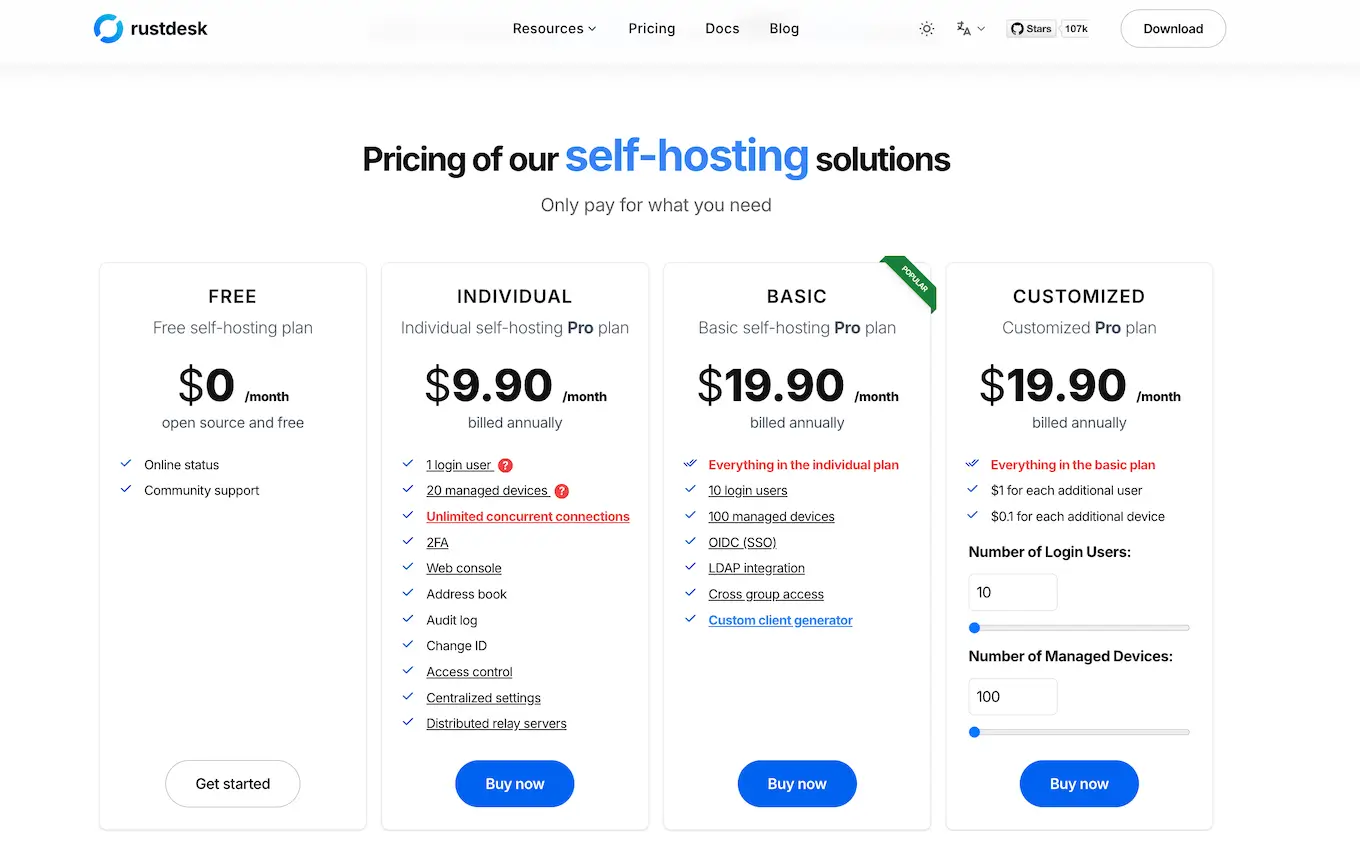
RustDesk is a great choice for specific needs, like personal use or simple business scenarios. Still, professional deployments will require a subscription to the Pro plan. RustDesk pricing for Pro tiers requires annual billing with no monthly payment option. The Individual plan costs $9.90 per month ($118.80 annually) for one account and 20 devices. The Basic plan costs $19.90 per month ($238.80 annually) for 10 users and 100 computers. These plans unlock the web console, 2FA login, OIDC integration, and the centralized address book.
Additionally, RustDesk supports multiple platforms, including Windows, macOS, Linux, Android, and Web. All in all, people appreciate RustDesk for its simple setup and user-friendly interface.
Infrastructure and implementation costs – the largest cost factor
The software license is a small fraction of the total cost of ownership (TCO). RustDesk is architecturally unique because its server software is exceptionally lightweight, focusing on network I/O rather than high compute.
To support active enterprise workloads, a modest Azure B2s v2 instance (2 vCPU, 8 GiB RAM) is sufficient to handle over 1,000 concurrent relay connections. As of 2026, the compute cost for this instance is $60.74 monthly. Total monthly expenses average $100 for small teams and scale to $200 for enterprises to account for increased network bandwidth egress and managed disk storage for audit logs.
3-Year TCO Comparison Table (Baseline 2026)
| Deployment Size | Pro Plan Costs (3yr)* | Infrastructure (3yr)** | Implementation | Maintenance (3yr) | Total 3-Year TCO |
|---|---|---|---|---|---|
| 10 Users | $716 | $3,626 | $2,000 | $7,200 | $13,542 |
| 50 Users | $3,582 | $3,626 | $3,000 | $14,400 | $24,608 |
| 250 Users | $17,910 | $5,400 | $6,000 | $28,800 | $57,710 |
| 500 Users | $35,820 | $7,200 | $10,000 | $57,600 | $110,620 |
*Pro Plan assumes Basic licensing ($19.90/10 users/mo billed annually). 50 users = 5 licenses; 500 users = 50 licenses.
*Infrastructure uses Azure B2s v2 ($60.74/mo baseline) with scaled egress buffers ($40/mo for 50 users to $140/mo for 500 users).
Tactical deployment examples
Example 1: 50-User Team
A 50-user team cannot operate on a single Basic license. To remain compliant, the organization requires five Basic Pro plans at $1,194 annually. Infrastructure remains lean using an Azure B2s v2, however, IT labor, such as developers and helpdesk agents, is the dominant cost. Assuming that security hardening and regular patching average 4 hours per month, the first-year cost totals $8,154, including setup and multi-license procurement.
Example 2: 500-User Enterprise (The Maintenance Burden)
At the 500-user level, the “build vs. buy” argument reaches a tipping point. While the server still runs effectively on a mid-range Azure D4s v5 ($140.16/mo), the maintenance labor scales to 16 hours per month to manage SOC2/HIPAA audit logs, user offboarding, and high-availability backups. The 3-year labor cost of $57,600 may exceed the total cost of a fully managed commercial subscription and installation.
Why the total cost of ownership matters more than licensing fees
Evaluating the true RustDesk pricing requires you to look past the initial download and calculate the total investment in IT infrastructure and manpower.
Hidden costs in “free” open-source software
Hidden costs may account for 70% to 85% of a tool’s lifetime expense. For an open source alternative like RustDesk, these costs manifest through implementation labor and ongoing maintenance. Setting up your own server requires internal IT teams to manage configuration, testing, and deployment. Without vendor SLAs, your staff assumes the burden of troubleshooting and security patching. Gartner research confirms that managing and supporting an in-house system consumes significantly more labor than a managed solution. These opportunity costs prevent your team from focusing on strategic growth.
- Implementation: 15–30% of TCO
- Maintenance: 40–60% of TCO
- Support: 10–20% of TCO
- Strategic Growth: Loss of focus on core business
Risk-adjusted costs and compliance considerations
Financial leaders must account for risk-adjusted costs. In 2026, the average cost of a data breach in the United States reached $10.22 million (a 9% surge). Self-hosting RustDesk places the full burden of regulatory compliance on you. Achieving HIPAA, SOC 2, or GDPR standards requires expensive internal audits and security tooling.
Furthermore, open source licenses lack vendor indemnification. If a security incident occurs, you lack a partner for liability or legal support. This gap will increase cyber insurance premiums and expose the business to significant financial risk during downtime.
Other cost factors to include in your RustDesk budget
Strategic budgeting for remote support means identifying expenses beyond the initial RustDesk client download. While the free version eliminates licensing fees, it introduces high technical and operational costs in your long-term plan.
Technical infrastructure costs
To install RustDesk server, you must provision a secure operating system and hardware instance. A perfect alternative to public cloud dependencies is a dedicated machine or a Synology NAS for smaller teams. However, enterprise-grade remote connections require a proper IT infrastructure. You must budget for high-speed internet with enough throughput to accept hundreds of concurrent connection requests. Storage for audit logs and data backups is critical for compliance and should be configured with redundancy at every point.
- Cloud Hosting: AWS/Azure (e.g., t3.medium) costs $200–$500/month for 100 users.
- Networking: Dedicated bandwidth to ensure low-latency remote desktop access.
- Security Stack: SIEM integration and vulnerability scanning tools.
- Backups: Off-site storage for server configurations and account data.
Personnel and operational costs
The ability to self-host shifts the burden to your IT teams. Detailed instructions in the community forums help, but they do not replace dedicated customer support. You must account for the labor required to set up, patch, and monitor the solution. Internal helpdesk staff will spend time assisting users to connect and create new remote connections. Unlike proprietary tools, RustDesk requires you to manage the entire lifecycle of the server software.
| Cost Factor | Verified 2026 Range | Frequency | 2026 Strategic Note |
|---|---|---|---|
| Cloud Hosting | $1,200 – $3,000 | Annual | Adjusted Down: Based on verified Azure B2s v2 rates (~$100/mo incl. bandwidth). |
| Implementation Labor | $2,400 – $4,000 | One-time | 20–40 hours of Senior Admin time at $100/hr for setup and hardening. |
| Admin Time (Monthly) | $4,800 – $9,600 | Annual | 4–8 hours/mo for patching and log reviews at $100/hr. |
| Security Tools | $3,000 – $6,000 | Annual | Requires EDR/AV on the server and SIEM log integration. |
| User Training | $1,000 – $2,000 | One-time | Development of internal SOPs for Windows, macOS, and mobile. |
| Helpdesk Support | $5,000 – $15,000 | Annual | Internal tickets for “ID not found” or NAT traversal issues. |
RustDesk pricing impact across different organization sizes
Deployment costs shift based on your scale, industry regulations, and internal teams.
Small Business Deployment Costs and Considerations
A 25-user professional firm cannot operate on a single Basic plan, which is capped at 10 users. This firm would require three Basic Pro plans at a total of $716 annually. Cloud hosting on a burstable Azure B2s v2 instance costs $60.74 monthly (approx. $729 annually), providing a massive performance overhead for this scale.
While the hardware is efficient, the “hidden” cost is IT labor. Initial setup and security hardening take 30 hours of senior time ($3,000 at $100/hr), while monthly maintenance including patching and monitoring consumes 4 to 8 hours. Without dedicated staff, the business faces significant risks from slow security patching. At this scale, the DIY model is only cost-effective if the firm ignores its own labor costs. When accounted for, RealVNC Connect provides a lower TCO by eliminating the server management burden entirely.
Mid-Market and Enterprise Cost Scenarios
A 200-user tech company requires 0.5 FTE (Full-Time Equivalent) for remote administration and approximately $5,000 annually for secondary security tooling (EDR and SIEM integration) to monitor the self-hosted gateway.
Enterprise firms with 500+ users face a different financial reality. Beyond the approximate $11,940 annual licensing, the primary cost driver is compliance maintenance. Meeting SOC 2 Type 2 or PCI-DSS standards in 2026 requires dedicated internal resources for audit readiness, redundant failover instances, and approximately $30,000 to $50,000 for annual third-party audits. Managing the community code internally at this scale requires roughly 1.0 to 1.5 FTE of specialized security and systems engineering. For most enterprises, the operational risk and “maintenance tax” of a self-hosted solution eventually exceed the cost of a managed commercial platform like RealVNC.
Common cost pitfalls when deploying RustDesk and how to avoid them
Successful RustDesk server deployment depends on proactive budgeting for hidden expenses. We spot a few challenges in this area:
- Underestimating maintenance
- Our solution: Budget 0.5 FTE for admin time and consider a managed subscription.
- Unpredictable scaling costs
- Our solution: Model bandwidth at 5x usage and monitor internet egress fees.
- Security response without vendor support
- Our solution: Fund a third-party incident response retainer and higher cyber insurance.
- Unexpected compliance audit fees
- Our solution: Factor in re-certification costs or choose a pre-certified alternative.
Best practices for evaluating remote access software costs
We recommend a rigorous framework to compare RustDesk client deployments against commercial offerings.
Strategic cost evaluation checklist
- Calculate 3-year TCO including IT infrastructure, labor, and storage.
- Model costs at 2x scale to anticipate growth.
- Quantify risk costs for downtime and security incidents.
- Factor in the opportunity costs of diverted IT staff.
- Compare internal labor rates to vendor subscription prices.
- Include compliance costs for regulated sectors like healthcare or finance.
Cost optimization and monitoring framework
Establish a baseline by tracking all setup and cloud expenses for six months. Identify cost drivers like bandwidth or support tickets. Optimize by managing infrastructure through automation or right-sizing your instance. Review the build vs. buy decision quarterly as usage data reveals the true total cost of ownership. Avoid ignoring staff time or skipping the security analysis.
RealVNC Connect: Predictable pricing with lower total costs
When you evaluate RustDesk’s pricing page against commercial alternatives, you’ll see that RealVNC Connect provides a professional, secure environment with predictable subscription fees that eliminate the hidden costs of UT infrastructure management.
Transparent pricing model
RealVNC Connect offers simple tiers:
- Essentials ($8.25/month) $3.69 per device, monthly
- Plus ($16.50/month)
- Premium ($29.75/month)
*billed annually.
High-volume enterprise deployments utilize customized plans. Unlike self-hosted tools, these prices include the cloud relay, 24×7 monitoring, and 256-bit AES-encrypted connections. You pay only for the usage or devices you need, with no surprise bandwidth or storage invoices.
Five cost-saving differentiators
- Pre-certified compliance: Avoid up to $50,000 in annual audit costs for ISO 27001, HIPAA, and PCI-DSS.
- Included vendor support: Access 24×7 expert assistance instead of staffing a dedicated internal team.
- Zero infrastructure management: Eliminate server hosting, backup systems, and maintenance labor.
- Automated patch management: Reduce IT teams’ admin time from hours monthly to near-zero.
- SLA guarantees: Secure 99.9% uptime compared to the best-effort availability of a free version.
For example, Arup, a global firm with 13,000 professionals, deployed 17,000 RealVNC licenses across 40 countries. This transition reduced operational costs and enabled faster issue resolution at an enterprise scale that “free” tools cannot match.
Make informed decisions about remote access software costs
Our RustDesk pricing analysis confirmed that “free” licenses carry substantial operational burdens. While the core code is $0, you must account for the infrastructure, labor, and compliance expenses that typically exceed commercial subscription rates.
The choice depends on your organization’s size, technical resources, and risk tolerance, but make sure to evaluate the build-vs-buy decision based on the complete financial picture.
Your key takeaways
- Free isn’t zero. Infrastructure, maintenance, and security expenses often exceed license costs.
- 3-Year TCO is the metric. Use total investment over time to compare self-hosted vs. managed solutions.
- Account for risk-adjusted costs. Factor in the financial impact of security incidents and limited uptime.
PS: Explore RealVNC’s transparent pricing to calculate your potential savings.
Frequently asked questions about RustDesk pricing
Is RustDesk really free, or are there hidden costs?
The core code is free under AGPLv3. However, you must pay for server hosting, IT teams labor, and security tools. 3-year TCO for 100 users typically ranges from $25,000 to $45,000.
How much do RustDesk Server Pro plans cost?
Pro plans require annual billing. The Individual plan is $9.90/month, and the Basic plan is $19.90/month. These unlock features like 2FA, OIDC, and the centralized address book.
What infrastructure do I need to run RustDesk?
For 100 users, an Azure B2s v2 instance (2 vCPU, 8 GiB RAM) at $60.74 monthly is more than sufficient. You should budget an additional $40/mo for managed disks and bandwidth egress.
How does RustDesk’s total cost compare to RealVNC?
RealVNC Connect starts at $8.25/month, including infrastructure and support. Overall, RealVNC often has a lower TCO by eliminating maintenance and compliance labor.
What compliance certifications do I need for self-hosting?
You are responsible for HIPAA, SOC 2, and PCI-DSS audits. Internal and third-party assessments cost $15,000–$50,000+ annually. In contrast, RealVNC already includes these certifications.
How long does RustDesk implementation take?
RustDesk doesn’t have an installation time averaged on their website. However, as claimed by them, “the hardware requirements are very low; the minimum configuration of a basic cloud server is enough, and the CPU and memory requirements are minimal.” Please account for labor costs that range from $3,000 for small setup projects to $40,000+ for enterprise hardening, testing, and documentation.