When you have spent time in cybersecurity spaces, you know that when it comes to attack vectors, remote access tools tend to represent a sizable chunk of the risk. IBM’s X-Force Threat Intelligence Index confirms this, with 17% of all cyber attacks in North America last year involving remote access tooling.
RustDesk is one such remote access tool that leans more toward enterprise use, thanks to its easy-to-configure, OSS, self-hosted connection relay. RustDesk is also open-source, and fFor a team that values transparency and control, that combination looks quite attractive. It also triggers the usual scrutiny of security and compliance.
That’s because open-source software can carry hidden enterprise security and support costs. Organizations that rely on open-source software report a security incident rate of 64-65% over the last 24 months. Enterprises that used fully business-grade commercial software only reported an incident rate of 22%.
The reality for businesses that choose open-source and free software is that they are statistically tripling their risk of a security breach.
When validating remote access software, teams will view security through four lenses:
- Encryption protects traffic.
- Authentication governs access per user and device.
- Vulnerability handling reflects how the development team releases fixes.
- External audits and certifications provide evidence that security claims hold up.
RustDesk and many open-source remote access tools typically cover these well, but as enterprise needs scale, the question becomes whether security teams can produce evidence that auditors, insurers, and customers expect.
This guide aims to explore:
- How RustDesk secures sessions.
- Why assurance evidence affects risk decisions.
- How to judge self-hosting vs enterprise support.
RustDesk server security architecture and features
RustDesk is a relatively intuitive and user-friendly way to implement remote access. A user shares an ID and a one-time password, then initiates the remote control session. RustDesk provides a near full cross-platform remote access solution, with client apps for Windows, Linux, macOS, Android, and iOS.
The self-hosted RustDesk relay runs two server processes:
- HBBS: handles the rendezvous and signalling.
- HBBR: The relay itself.
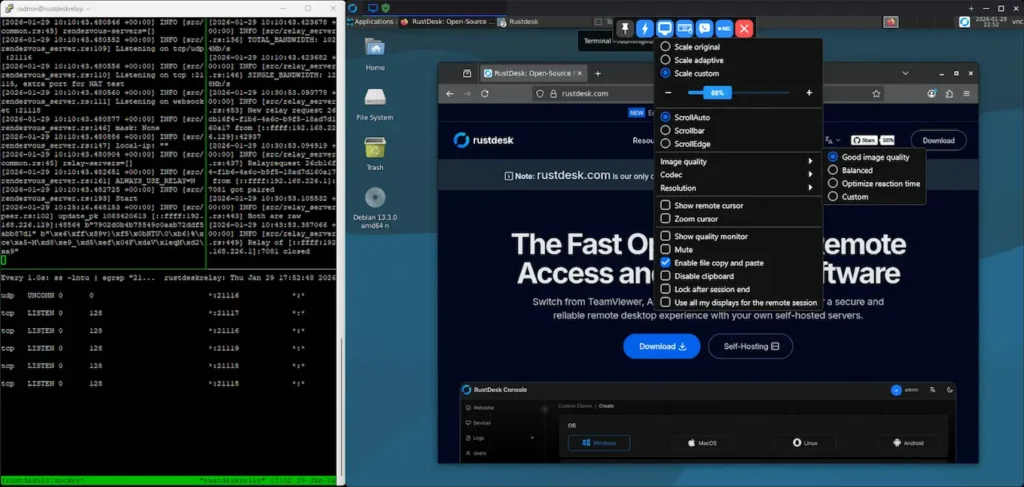
RustDesk sessions will try NAT hole punching first, followed by a fallback to the relay (RAW) upon failure. Often, direct sessions will just work, and relay stays idle. RustDesk does have an option to reverse proxy with Nginx over HTTPS (Pro version only), but in the default installation, the core ports used are TCP 21114 – 21119 and UDP 21116.
RustDesk security strengths
RustDesk’s documentation indicates direct (p2p) and relayed sessions are protected end-to-end with encryption based on NaCl (Salt). When configured correctly and with adequate security hardening on the relay host, an intermediary server cannot decrypt session data, even when the relay server is transporting packets.
| Feature | Implementation | Benefit |
|---|---|---|
| Encryption | NaCl-based E2EE | Reduces data exposure |
| Connectivity | Direct first, relay fallback | Less relay dependence |
| Self hosting | hbbs and hbbr on your infra | Local access control |
| Trust setup | Pin relay/server ID and API key in the network configuration | Lowers spoofing risk |
| Open code | Public repos and issues | Enables review |
Security considerations and limitations
Running your own RustDesk server moves all operational burden onto your team. This means patching, OS hardening, monitoring, and log review all become part of your day-to-day support workflows.
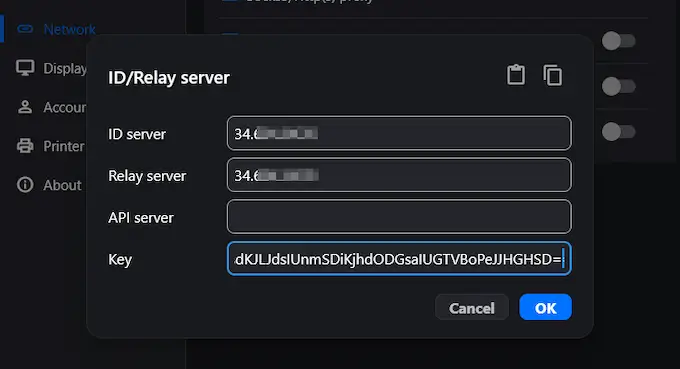
Security out-of-the-box is tighter than many open-source remote access alternatives like TigerVNC and TightVNC, but it still requires technical effort to configure, deploy, and secure the relay service and import the server ID and Keys to the client apps – all of which are owned by internal teams.
CVE 2024 25140 incident (now in dispute) shows why trust stores deserve respect and why open-source doesn’t always mean that “eyes on the code” equals security validation. With this CVE, RustDesk version 1.2.3 placed a WDKTestCert certificate into the trusted root certification authorities with a code signing usage. If that key were compromised, software could, in theory, be signed and treated as trusted.
One security incident doesn’t define the entire security posture of RustDesk, but how quickly a vendor can detect issues, publish guidance, and push remediation can. The table below compares security assurance expectations in open-source/self-hosted vs. an enterprise vendor model:
| Aspect | Open-source self-hosting | Enterprise vendor model |
|---|---|---|
| Third-party audits | Customer commissioned | Published reports |
| Vulnerabilities response | Community plus policy | Dedicated team |
| Support | Best effort | SLA backed |
| Compliance evidence | Customer produced | Vendor attestation |
| Infrastructure responsibility | Customer server | Vendor or shared |
| Incident response | Customer runbooks | Vendor guidance |
Why remote access audits and certifications matter for assurance
Audit reports and certifications give risk and procurement teams an independent form of evidence showing how remote desktop software protects data, manages access, and handles security vulnerabilities.
Understanding security certifications and their business value
ISO 27001 provides validation that an information security management system is keeping data secure. SOC 2 shows whether controls actually operate the way a vendor claims. HIPAA and PCI-DSS cover data regulations and frameworks. NIS2 adds governance and incident reporting accountability and duty.
A remote access solution that targets enterprise business should be able to provide each and every one of these assurances via a trust center.
| Certification | What it validates | Business benefit |
|---|---|---|
| ISO 27001 | ISMS governance | Faster due diligence |
| SOC 2 | Control testing | Clearer sign-off |
| HIPAA | Healthcare safeguards | Lower audit friction |
| PCI-DSS | Payment controls | Reduced card exposure |
| NIS2 | Resilience duties | Clear accountability |
Professional security audits vs community review
RustDesk software is open-source, and that means collaborative, transparent, and iterative vetting of code, documentation, and security by developers worldwide. However, enterprise stakeholders typically ask for more than just a community review. They need scope statements, testing that can be repeated, and a clear cadence that can be presented during audits and contracts.
Commercial vendors like RealVNC Connect provide a third-party white-box audit that is built precisely for this level of assurance.
Encryption and authentication controls in practice
Remote access security strength depends on two things. Encryption standards for data protection, and authentication for access control.
Encryption standards and implementation
RustDesk relies on NaCl (Salt) cryptographic building blocks:
- Crypto_sign_ed25519: Digital signatures used to prove a message came from who it claims.
- Crypto_box_curve25519xsalsa20poly1305: The public-key authenticated encryption, used for exchanging secrets without password sharing.
- Crypto_secretbox_xsalsa20poly1305: Symmetric authenticated encryption used once on both sides to encrypt and authenticate session data.
In plain terms, it means remote desktop traffic stays encrypted end-to-end. The server that brokers sessions cannot read it by default.
In commercial remote access platforms, it’s more common to see stronger security features that standardise around TLS 1.3 with AES-256-GCM and RSA keys, plus Perfect Forward Secrecy. These are typically backed with audited key handling and encrypted storage for credentials.
Both models can be secure, but the difference lies in the assurances that can be offered by commercial vendors.
Authentication and access controls
The RustDesk free OSS self-hosted relay uses an ID and one-time password tied to the client itself. It works, but enterprise stacks need reliable authentication, permissions, and access that integrate with their existing systems, like Azure AD/Microsoft Entra, identity/SSO providers, and Okta:
| Authentication feature | Implementation considerations | Security impact |
|---|---|---|
| Password policy | Length, rotation, lockouts | Reduces guessing |
| MFA | TOTP, FIDO2, U2F | Blocks stolen creds |
| SSO | SAML, OpenID Connect | Central control |
| Session controls | Timeouts, limits, geo rules | Reduces misuse |
| Audit logging | Retention, SIEM export | Supports investigations |
Security requirements by industry and data type
The IBM X-Force Threat Index manufacturing (26%), finance and insurance (23%), and healthcare (5%) were the most targeted industries in 2025. Healthcare and finance, in particular, demand extra caution because regulators regard remote access to sensitive data as a control surface. A hospital or a bank needs evidence retention and change control.
Healthcare and HIPAA compliance considerations
Healthcare teams must prove that their remote access platforms safeguard protected health information (PHI).
- Sessions must lock down access per user and computer.
- Audit logs must be retained for investigations
- Support ownership typically requires BAAs.
- Penalties for failing to do so can cost organizations up to $50,000 per violation.
Financial services and critical infrastructure security
Finance and operational technology environments treat remote access paths as high-risk entry points for malicious actors.
- PCI DSS 8.3 requires MFA for remote entry into cardholder environments.
- SOC 2 evidence supports repeatable controls and sign-off.
- NIS2 adds governance, supply chain focus, and incident reporting duty.
Teams employed in high-risk sectors like manufacturing, healthcare, and finance must validate and document security themselves if a self-hosted solution like RustDesk is in place. With a commercial vendor, trust centers and assurances are readily available, absorbing much of the risk and responsibility otherwise placed on the shoulders of administrators.
Managing ongoing security risk for remote access
For organizations running open-source software like RustDesk, OpenSSF recommends running regular audits and vulnerability checks, as well as automating security checks in your CI/CD process. CISA’s guidance on securing remote access platforms also includes frequently reviewing logs, controlling access with network-based allowlisting, and blocking inbound and outbound management on relays and servers on the perimeter firewall.
Common concerns and mitigation steps
- Challenge: Vulnerability discovery and patching: Subscribe to advisories, track CVEs relevant to your infrastructure, and patch on a defined cadence. OpenSSF recommends continuous monitoring and routine assessments.
- Challenge: configuration security: Apply security benchmarks, manage configuration as code, and validate changes in staging before you push them to prod.
- Challenge: supply chain security: Open-source dependencies and community build paths can quickly become attack paths. Always use software composition analysis (SCA) and verify signatures.
- Challenge: insider misuse and privilege abuse: Legitimate access can be misused. Sometimes on purpose, but often accidentally. Enforce least privilege, set session controls, follow zero-trust principles, and audit logs for anomalies so misuse shows up before it turns into a major incident.
A practical evaluation checklist for remote desktop software
- Confirm end-to-end encryption and key handling.
- Enforce MFA and a strong password policy.
- Validate SSO and RBAC fit for each user.
- Check audit logging, retention, and SIEM export.
- Review the update process and incident playbooks.
- Map controls to an outcomes framework such as the NIST CSF 2.0 functions, which organizes work into Govern, Identify, Protect, Detect, Respond, and Recover rather than treating security as a one-time checklist.
When audited assurance matters: RealVNC Connect
Some smaller teams and businesses can afford to run self-hosted remote access tools like RustDesk, but larger organizations that need assurance they can hand to procurement, risk, and auditors need an enterprise-ready solution.
RealVNC Connect is built for that purpose. With over 25 years of experience in building remote access technology for business, RealVNC Connect has strong, validated security features plus enterprise-grade integrations that businesses need.
RealVNC Connect has undergone an independent, third-party white-box assessments by Cure53, the first and only remote access tool to validate its security. The latest Cure53 engagement, combined with a white-box penetration test with source-code review across multiple RealVNC components, found that the in-scope applications were perceived as having a strong and stable security posture.
RealVNC Connect takes security seriously. Download the RealVNC Security Whitepaper today to find out why we are the trusted and safe choice for enterprise remote access.
Decision framework for choosing remote access
RustDesk can be secure when teams can run a self-hosted, hardened relay server and respond fast to vulnerabilities. “Safe enough” really depends on what data you handle and what evidence your organization must provide to validate its security.
Use three questions to decide:
Do you have security staff to audit, configure, monitor, and patch?
Do you need formal compliance evidence such as ISO 27001, HIPAA, or PCI-DSS?
Do you require vendor accountability with defined response expectations?
If you answer “yes” to any of these, prioritize remote access software with published assurance, predictable support, and controls you can actually stand by in an audit.
Key takeaways:
- Self-hosting gives you control, but comes with an operational burden.
- Audits and certificates reduce uncertainty for regulated remote access.
- The total cost includes people, tooling, and monitoring, not just the money you pay.
If audited assurance matters to your organization, start with the RealVNC Trust Center and ask is RustDesk safe in your operational reality.
Frequently Asked Questions
Is RustDesk’s encryption strong enough for enterprise use?
RustDesk uses modern cryptography via NaCl and supports end-to-end encryption. The encryption is considered enterprise-grade, but companies should still verify key handling, deployment choices, and controls through strict internal testing.
Has RustDesk had any major security vulnerabilities?
Yes, CVE-2024-25140 involved improper root certificate installation. It was promptly addressed, but it highlights how important professional security practices and quality assurance are to enterprise remote access.
Is self-hosting RustDesk more secure than cloud services?
Self-hosting open-source software does mean you have more control over data sovereignty and provides independence. However, this comes with the trade-off of the administrative and security burden falling on internal teams who must validate offline and internet-exposed remote devices.
Can I trust open-source remote access software?
Open-source software has complete code transparency. This means that the code is more accessible and reviewable by everyone, including both helpful and harmful actors. Many organizations find open-source software more trustworthy than closed-source software for this reason. This open-source transparency can create a false sense of security if ownership, patching, and validation are assumed rather than proven. Community code review doesn’t replace the importance of formal security audits by professional, independent firms.