


Remote access is now a normal part of IT operations. And this is not limited to standard user accounts, which are restricted to routine tasks and everyday operations. It also includes privileged accounts with elevated access for managing and controlling critical systems. For example, modern operations often involve administrators logging in to production servers from home or engineers troubleshooting critical systems on the go.
However, privileged remote access carries greater security risks. If a remote session involving these accounts is not properly secured, unauthorized persons can gain access to critical systems, sensitive data, and core infrastructure. Needless to say, that can lead to devastating consequences.
This is why privileged remote access management is now an important part of organizational IT deployment. It is how organizations secure remote sessions to critical systems.
This article breaks down what privileged remote access management means in practice, why it matters, and the best practices for getting it right.
What is privileged remote access management?
Privileged remote access management (PRAM) is a cybersecurity approach that monitors and controls how users with high-level access connect to systems remotely. The goal of PRAM is to ensure that when a user with elevated permissions connects to critical systems remotely, the connection is safe from attackers.
Unlike general remote access management, which covers all users, privileged remote access management focuses on securing the remote sessions of users with elevated access, such as system admins, root users, and system operators. These people do not just “use” systems, but can control them, as they can:
- Install or remove software
- Change system settings
- Access sensitive or restricted data
- Manage other users
Because of this power, their accounts are a major target for hackers, especially during remote sessions.
Privileged remote access management ensures that those sessions are secure. It is a controlled gateway between an organization’s high-access users and critical resources when connections to the system originate from outside the traditional network boundary. It uses a combination of processes and technology to control who can access critical internal systems and provide visibility into what they are doing while logged in.
In practice, effective privileged remote access management is built on a few key controls:
- Verifying access before a session begins (often using multiple layers of authentication to ensure the user is legitimate)
- Tightly controlling permissions, such that users get access to only what they need
- Making access time-bound (meaning that privileges are granted temporarily and expire after a set period)
- Monitoring sessions in real time and even recording them for auditing purposes
- Logging every action within a session to create a clear audit trail.
- Automatically terminating sessions if suspicious activity is noticed.
Why privileged remote access management matters
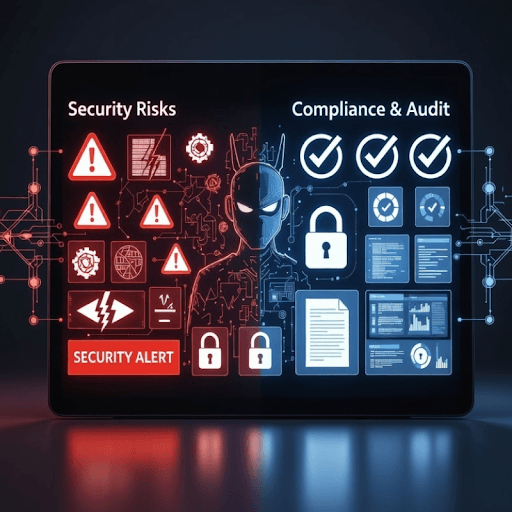
Privileged remote access management matters because
- Compromised privileged remote access sessions can come with devastating consequences.
- Organizations now need to follow security rules and prove to regulators that privileged access to sensitive resources is properly controlled, monitored, and documented.
Security risks of unmanaged remote privileged access
Privileged accounts are powerful accounts that can access sensitive data, make changes to configurations and data, and even shut down systems. Unmanaged remote privileged access can lead to that kind of power being misused or, worse, falling into the wrong hands.
And that creates some of the most serious cybersecurity risks organizations face. These include:
- Credential theft and account takeover: If privileged accounts are not protected, hackers can steal passwords through phishing or malware. Once they successfully log in, they gain full control of systems and can read confidential data, change system settings, and disable security controls.
- Data breaches: Without effective controls, attackers can use privileged credentials to access databases, servers, and backups. Once in, they can steal or disclose sensitive data (such as customer information), resulting in privacy violations, financial loss, or reputational damage.
- Insider threats: Employees or contractors with remote privileged access may intentionally misuse their permissions by accessing systems they should not access. These users may then view confidential records, copy sensitive files, or make unauthorized changes.
- Lack of visibility. Unmanaged remote privileged access also means an organization does not record remote privileged sessions or log actions during those sessions. Without this, it will not know who accesses critical systems and what they do while inside, allowing malicious attacks to go unnoticed. A hacker could be inside for weeks, and no one will know.
- Persistent attacks: Without adequate privileged user access controls, a short-term breach can become a long-term compromise. Attackers may create hidden access points that allow them to always reconnect to the system, even when you change passwords.
Compliance and audit requirements
Privileged access management is no longer optional, as today’s organizations must comply with industry standards and government regulations requiring strict controls over access to sensitive systems and data.
External regulators may periodically review an organization’s systems to determine whether they comply with relevant cybersecurity regulations. It is not enough for organizations to enable secure access for privileged users. They must also be able to provide digital evidence of this via detailed logs and full recordings of privileged sessions.
Failure to demonstrate that appropriate safeguards were followed may result in loss of certification or other applicable penalties. And that can erode customers’ trust.
Key features of a privileged remote access management solution
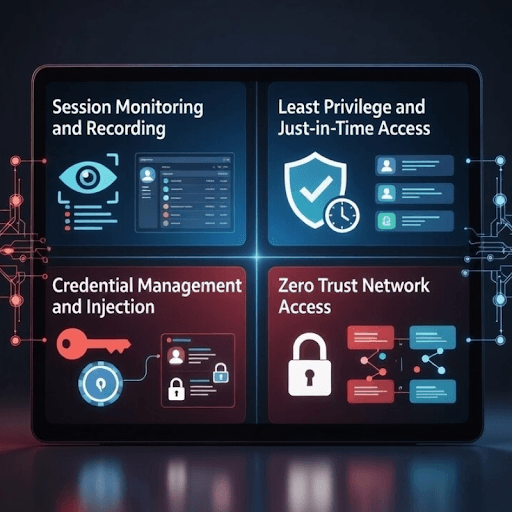
A remote access management solution that can effectively address an organization’s need to protect sensitive systems from internal and external threats and to support regulatory compliance must have the following features:
Session monitoring and recording
A remote access solution should have session management capabilities and provide visibility into the activities of privileged remote users. That is, when a user logs into critical infrastructure with privileged credentials, the solution should track their actions in real time (noting every command and when it was issued) and even record the entire session.
Remote session monitoring and recording offer accountability and traceability. If a security incident occurs, system administrators can review the logs and recordings to identify the responsible user and reconstruct exactly what happened. But without continuous monitoring, malicious or accidental activities may go on undetected.
Least privilege and just-in-time access
Effective privileged access management (PAM) solutions should provide controlled access using the least-privilege and just-in-time principles.
Least privilege access means granting users only the minimum level of access required to perform their tasks, while just-in-time access means granting users access only for the duration they need it to perform their task.
This reduces insider threats by preventing authorized users from misusing their access (e.g., accessing systems and data outside their responsibilities or at odd times). It also reduces external access threats because if a privileged account is compromised, the attacker’s capabilities are limited in scope and time.
Credential management and injection
Good privileged remote access solutions address the risk associated with handling privileged credentials with secure credential management and injection.
Secure credential management entails storing sensitive privileged credentials (such as admin passwords) in a secure vault instead of giving them to users, while credential injection means automatically logging in a privileged user when access is required, rather than requiring them to type the password.
In practice, the user logs in to the privileged access management tool (using their unique, non-transferable identity) and requests access to the server. The tool verifies the user’s identity (using multi-factor authentication), then retrieves the password from the protected vault, and logs the user in to the server.
With these features, users cannot reuse their credentials elsewhere or share them, whether intentionally or accidentally.
Zero Trust network access
A privileged remote access solution should tighten control with the Zero Trust remote access approach, which is a modern security model with the rule “Never trust. Always verify.”
It means the solution does not trust any user or device by default, so every user and device must be verified each time. Whether the user is connecting from inside the company’s network or not, they must be verified. And when verified, they do not gain broad network access; instead, access is limited to a single system (or only what is strictly necessary).
The Zero-trust access approach not only reduces the risk of attacks but also reduces your attack surface because even if an attacker gains access, they cannot move across systems.
Privileged remote access best practices
Effective privileged remote access management does not rely on technology alone. While a security tool matters, so also are clear rules, policies, and procedures. Some of these best practices for ensuring remote access security for privileged user accounts are:
Define a remote access policy for privileged users
Organizations should have clear rules that explain how privileged users should connect to systems. This should provide granular access controls by clearly stating:
- Who can access systems (e.g., admins only)
- When/under what conditions (e.g., only during work hours, with approval)
- What they can access (e.g., only what they need, not everything)
It should also define security requirements such as the use of multi-factor authentication, approved devices, and secure connection methods.
These rules ensure that access is consistent and controlled and prevent unsafe practices that can lead to security breaches (such as using unsafe devices or connecting over public Wi-Fi).
Secure third-party and vendor access
Third parties (like vendors and contractors) sometimes need privileged access to a company’s systems. However, because third parties operate outside the company’s direct control, they can introduce security risks. For example, they may use weaker security practices, which can cause them to accidentally expose systems when they connect.
To mitigate this risk, organizations should limit third-party vendors’ access to specific systems, grant access only for short periods, and monitor their activity. Also, instead of providing privileged passwords, access should be granted through a secure privileged access management system that verifies user identity through multiple authentication layers and automatically logs them in.
These processes ensure that third-party vendors can access only what they need for their work and that they do not knowingly or unknowingly share privileged credentials.
Implement session recording and audit trails
Organizations should log remote sessions by privileged users and, where possible, record them in detail. This creates a comprehensive record of who accessed which system, when they accessed it, and what they did while inside.
These records help meet both security and regulatory compliance requirements. When a security breach occurs, organizations can use the records to investigate and determine the cause. Since detailed audit trails show that privileged access is properly controlled and monitored, organizations can use these records to show compliance with regulatory requirements.
Replace VPNs with secure remote access tools
For enhanced security controls, organizations should use remote access tools as VPN replacements.
Virtual Private Networks (VPNs) give users remote access to internal networks. But once the user is connected, they can access all critical systems, increasing the attack surface.
In contrast, remote access tools offer a more controlled approach. They grant access only to specific systems based on the user’s role to limit the potential damage from compromised credentials.
These can also work in parallel.
Also read: On-Premise Remote Access: Complete Enterprise Guide for Secure Connectivity
Conclusion
Today’s teams often need to access critical systems remotely to maintain operational efficiency. Privileged remote access management helps secure these sessions, ensuring that unauthorized users do not gain access to critical systems and infrastructure.
Ensuring remote privileged access security involves choosing the right tool and setting clear rules. The best remote privileged remote access management tools offer dynamic access control, session recording, and credential vaulting. This is where RealVNC comes in.
RealVNC is a cloud-brokered tool that enables secure, controlled remote access to critical systems, allowing privileged users to perform necessary work from anywhere. With strong emphasis on security features and standards, RealVNC keeps systems safe with granular permission controls, full session encryption, real-time session monitoring and recording, least-privilege and time-bound access, and more.
Ready to secure privileged activities with the world’s safest remote access solution? Get RealVNC today!
FAQs
What is the difference between privileged remote access management and PAM?
Privileged remote access management (PRAM) focuses on securing sessions when users connect to critical systems remotely, while privileged access management (PAM) focuses on managing and securing users’ access to critical systems from anywhere.
Why are VPNs not sufficient for privileged remote access?
VPNs are insufficient for privileged remote access because they do not control what happens once access is granted. They do not offer real-time monitoring, and they provide broad network access rather than restricting it to a single system.
How does privileged remote access management protect against third-party vendor risks?
Privileged remote access management controls third-party vendor risks through several practices, including granting access to only specific systems, monitoring their activity when connected to critical systems, and automatically terminating sessions if suspicious activity is detected.
What compliance standards require privileged remote access controls?
Security standards that require organizations to tightly control privileged access include:
- PCI DSS (Payment Card Industry Data Security Standard)
- HIPAA (Health Insurance Portability and Accountability Act)
- SOX (Sarbanes-Oxley Act)
- GDPR (General Data Protection Regulation)
How does RealVNC Connect support secure privileged remote access?
RealVNC provides strong authentication controls that help ensure that only authorized personnel can access critical systems. It also provides end-to-end encryption, keeping sessions safe even when the connection is over the internet. There is also granular access permissions, allowing admins to control who accesses which systems and what level of access they have. RealVNC also provides session monitoring and logging, which provides a detailed audit trail.